Posted by:
Admin
Date:
June 16, 2026
Category:
blogs
Error: Contact form not found.
Cloud Accounting vs Traditional Accounting: Which Is Better for UK Businesses?
Are you still dealing with your business financial affairs the traditional way? Knowing the differences between cloud accounting vs traditional accounting can assist UK firms in choosing the most reliable solution.
You might know what traditional accounting is but may not have any idea about cloud based accounting.
It is vital to pick the right financial system for growth, compliance, safety and efficiency.
Firms handle their cash flow data in two ways:
- Cloud accounting
- Traditional accounting
Studying cloud accounting vs traditional accounting and selecting one can impact how firms track their financial performance.
Classical setup often uses paper files, Excel, desktop software and manual steps.
On the other hand, in cloud accounting, you store your financial records on the internet. In this system, you allow firms to access data anywhere online, in real time.
For many years, UK firms mostly relied on traditional accounting software. This is because, in this system, you are able to access full control over your cash details offline.
Modern cloud accounting software is becoming prevalent because it is flexible and easy to use.
So, instead of sharing files, owners and auditors can work together on the same financial records at the same time. In the UK, most firms are now shifting towards digital accounting.
Studying cloud accounting vs traditional accounting shows which method is faster, easier and more reliable for running business finances.
Research shows that nearly 80% of UK accountants adopted cloud accounting in 2024. On the other hand, the use of traditional systems was only 13%.
However, both these modes still have pros and cons. These benefits and cons are based on the working style, security norms, costs and business needs. Firms also pick finance systems based on cost, capacity and support for remote work. In addition, they also consider Making Tax Digital (MTD).
In this blog, you will learn about cloud accounting vs traditional accounting. Besides this, you will know their pros and cons. You will also explore which system is currently best for firms in the UK.
Key Takeaways
- Cloud accounting vs traditional accounting shows that cloud systems give faster access, while traditional systems give more control
- Traditional accounting vs cash basis helps businesses choose the right method for tax and reporting needs
- Cloud-based accounting lets users access financial data from anywhere using the internet
- Cloud-based accounting software helps reduce manual work through automation and real-time updates
- “What is traditional accounting?” refers to a system where data is stored on local computers and handled manually
- The benefits of cloud accounting include real-time data, easier teamwork, lower IT costs, and better scalability
What Is Traditional Accounting?
Traditional accounting is the way of using accounting tools on a PC or company server and saving financial data offline. In such cases, firms depend on basic finance methods, Excel or paper files.
Old systems work only on the specific PC of the office where their software is installed, unlike cloud accounting. Thus, if you want to access the financial data by remote means, it is very difficult. For this purpose, you have to add an extra tech setup.
Firms have long used traditional accounting software for taxes, reports, payroll and invoices. Even now, many reliable firms use this for their financial systems.
The reason is that they can run it without internet access, are reliable and offer local control over data.
Many UK firms argue about cloud accounting vs traditional accounting. However, they need to study each one in detail to know which is better for their company.
Making Tax Digital, with my accountant’s support, means it’s a lot less stressful for me now.
Gwyn Morgan, Founder, Tyr-Ex Ltd (Motor trade business, UK)
How Traditional Accounting Works?
A traditional accounting system follows a manual and local process. It is managed at the site by the business.
In this setup, you enter financial details into Excel or PC software. The records are then stored on local computers or servers.
In traditional accounting, the following steps are common:
- Enter costs and income by hand
- Store invoices and receipts in person or on local systems
- Update software manually
- Manage security and backups within the company
- Access to financial data is limited
- Use USB drives or email to share records
Firms must choose between traditional accounting vs cash basis with care.
With local software, firms manage the network, updates, data safety and upkeep themselves.
This offers the traditional method an advantage in terms of control in the cloud accounting vs traditional accounting discussion.
What Are the Pros of Traditional Accounting?
After the rise of cloud accounting, more and more firms are using it. Yet, some firms still find traditional accounting ideal for their systems. However, it is good to study traditional accounting vs cash basis in detail. It includes:
1. Offline Availability
You have offline access to traditional accounting, which is one of its biggest perks. Firms can work without the web, which keeps them running. This is very helpful for groups in zones with poor internet. Owners can check their files at any time with ease. They usually find it comfortable to use offline tools to work.
2. Full Financial Details Control
Traditional accounting gives you full control over your financial data. Data is kept on local systems. Firms manage backups, security and storage on their own.
Many firms pick this method because it is easy for them to handle financial data. They do not like to store data on third party servers.
3. Familiar Systems and Methods
Many famous firms still use traditional accounting systems because they know how to use them. This method helps avoid changes in the office and the need to train staff.
Firms with old and custom systems that are hard to replace may still benefit from traditional accounting.
4. Physical Document Keeping
Some firms still use paper records for admin or legal reasons. This is because companies that are not used to digital systems may find paper records easier to handle.
The comparison of cloud accounting vs traditional accounting can help show which one best fits your business demands.
What Are the Cons of Traditional Accounting?
Despite its pros, traditional accounting has some limits. This makes it less ideal for many current firms.
Lengthy Processes
The traditional accounting system relies mainly on manual data entry. All staff members must submit docs by hand.
For example, they enter financial records into Excel sheets or software. They also enter costs, bills and payroll details manually. This makes the process slow and prone to mistakes.
Issues With Collaboration
Traditional accounting systems are not made for quick teamwork. Firms sometimes share files via local networks, USB drives or email.
This is why some issues arise, like the following:
- Higher admin duties
- Version control issues
- Document duplication
- Slow communication
Working on the same financial data at the same time may also be tough for many users.
Cloud accounting vs traditional accounting determines collaboration speed.
Higher Operational Expenses
Over time, traditional accounting systems become so costly. This is why firms may need to bear their costs, such as the following:
- Hardware upgrades
- Software licences
- Backup facilities
- Safety systems
- IT support
- Local servers
- Hardware upgrades
These costs can rise much more as the firms grow.
Security Risks and Data Loss
Since local data storage gives you control, there are risks involved. If the financial files are stored on local systems, they may be at risk of:
- Not enough backups
- Accidental removal
- Fire harm
- Theft
- Hardware faults
Firms could completely lose key financial details if backups are not stored properly.
Safety is a crucial factor to consider in cloud accounting vs traditional accounting.
Manual Updates and Maintenance
You have to update and maintain traditional software manually. Firms must install updates, fix support issues and keep the software legal.
Firms handle all this manually but this becomes costly and takes so much time.
What Is Cloud Accounting?
A cloud accounting system is a way to store financial data safely on remote servers. It is used instead of saving data on local computers.
People can access the system through web using phones, tablets or laptops.
The working of cloud accounting systems is like software as a service (SaaS) platforms. Companies have to submit fees for an annual subscription or a monthly fee to access the software and its features.
Cloud accounting allows staff to work together from any place, unlike traditional accounting.
This system is popular in the UK for its remote work, automation and flexibility.
Did You Know?
Cloud accounting is now used by most UK businesses because it allows real-time access to financial data from anywhere.
How Cloud Accounting Works?
A cloud accounting system manages all financial details online. Files, bills, invoices and transactions are instantly accessible and updated seamlessly.
The common functions of cloud accounting are as follows:
- Automatic software updates
- Online receipt storage
- Payroll integration
- Automated backups
- Current financial data updates
- Live teamwork
- Budget tracking
- Digital invoicing
- Automatic bank feed integration
Companies don’t have to manage servers or do software upgrades because the provider controls them.
Backup processes are distinct in cloud accounting vs traditional accounting.
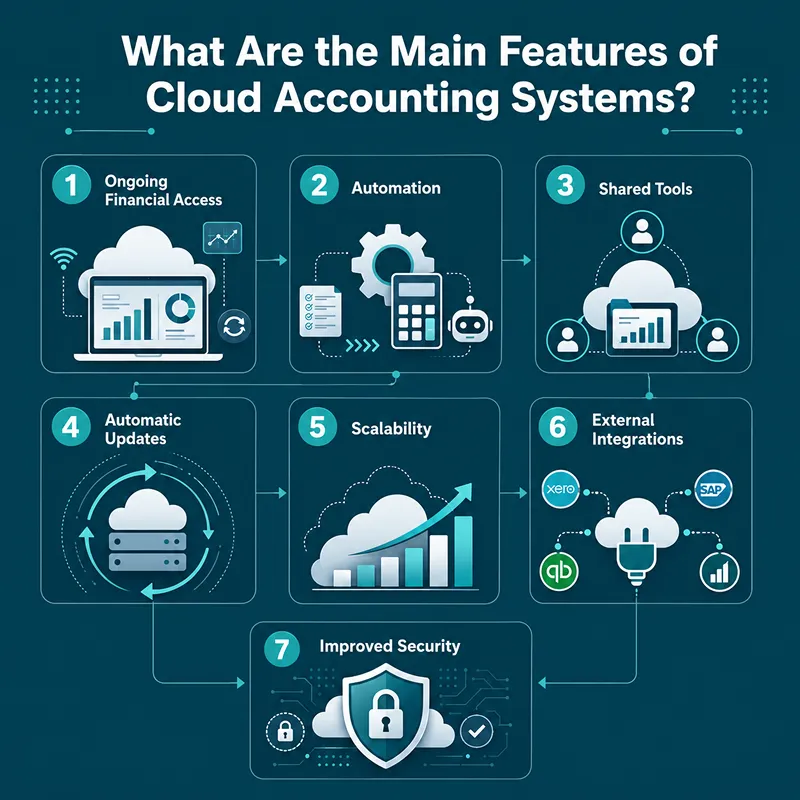
What Are the Main Features of Cloud Accounting Systems?
Cloud accounting tools come with a host of powerful features to help you boost efficiency. They also make it easier to manage it in your budget.
Ongoing Financial Access
24/7 financial access is one of the biggest perks of cloud accounting. Owners and accountants can see cash flow, payments and reports anytime, anywhere.
Firms always have access to the latest data, which helps them to make quick decisions.
Automation
Many complex accounting tasks are automated by cloud accounting systems, such as:
- Tax estimates
- Payroll handling
- Cost monitoring
- Invoice creation
- Reconciliation practices
- Bank payment imports
Computers lessen the risk of human faults and cut down the manual task load.
Shared Tools
To work within the same platform at the same time, cloud systems allow many people to work within it. Instead of sending paper files back and forth, firm owners, finance teams and accountants can work together live.
With the help of this, you can speed up routine tasks and improve interaction.
Automatic Updates
Cloud platforms can update via an automatic process, compared with traditional accounting software. Due to this feature, the cloud system does not require manual installation.
Also, firms always have access to security updates, tax compliance criteria and the most recent features.
Scalability
The scalability of cloud accounting systems is very good. Firms can easily:
- Integrate extra tools
- Expand space
- Upgrades to paid plans
- Add new members
For growing firms, this versatility makes cloud accounting ideal.
Companies assess cloud accounting vs traditional accounting to decide which strategy offers greater scalability as they expand.
External Integrations
Several business tools are integrated with today’s cloud accounting software, such as:
- Banking systems
- Tax software
- Payment platforms
- Inventory control tools
- Payroll software
- CRM apps
Firms can minimise unused work and optimise operations with the aid of integrations.
Improved Security
The cloud accounting providers that are most reputable use the following:
- Ongoing security tracking
- Safe servers
- Automatic backups
- Multi factor assurance
- Data encryption
These security measures usually go beyond what smaller companies can do on their own.
What Are the Pros of Cloud Accounting?
For UK firms, cloud accounting comes with multiple perks.
Easy Access From Anywhere
You can get access to financial details from any device that is linked to the internet. Due to this, flexible business tasks, travelling and remote working are possible.
Without being tied to an in house computer, company owners can track budgets in real time.
Remote work centres around cloud accounting vs traditional accounting.
Cloud accounting vs traditional accounting is distinct in data access.
Greater Efficiency
You can lower manual tasks and routine admin work with the help of automation. With the help of this, finance teams pay attention to more specific business tasks.
Cloud accounting is good for speeding up financial analysis and reporting as well.
Greater Collaboration
At the same time, accountants and teams work together promptly. Manual file sharing causes waiting times but shared access enhances contact.
Affordable Structure
Usually, cloud accounting runs via cost effective subscription models. Companies avoid making major initial investments in:
- Costly upgrades
- IT infrastructure
- Hardware
- Servers
For start ups and SMEs, this quality makes cloud systems highly appealing.
Cloud accounting vs traditional accounting has effects on cost efficiency.
More Easy Compliance
Making Tax Digital (MTD) and other UK regulatory rules are most often supported by cloud accounting software. Firms can stay compliant with current tax laws with the aid of automatic upgrades.
Companies look at cloud accounting vs traditional accounting for better MTD compliance of their firms.
Read more: Benefits of cloud accounting
What Are the Cons of Cloud Accounting?
Before making the switch, firms should take into account the issues related to cloud accounting, despite its many benefits.
Web Dependency
For cloud accounting systems, you will need a reliable internet link. Users may use vital accounting tools or may fail to access money records without web access.
This can be annoying and disruptive for firms that operate in areas with poor internet access.
Digital Security Issues
Even with strong security, some companies still fear storing financial data digitally.
Some of the hidden issues include:
- Online scams
- Illegal access
- Cyber attacks
- Data leaks
Most trusted cloud providers invest in tracking, encryption and secure platforms to reduce risks..
Training Curve
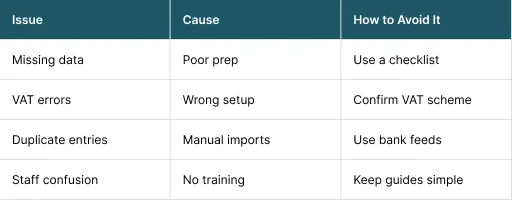
If you want to move from a traditional system to cloud accounting, you have to train your staff and process changes. Some workers may find cloud software confusing at the start if they were using only cloud software.
Firms may fully grasp the new platform and may need to change processes.
Cloud accounting vs traditional accounting decides the specific training needs.
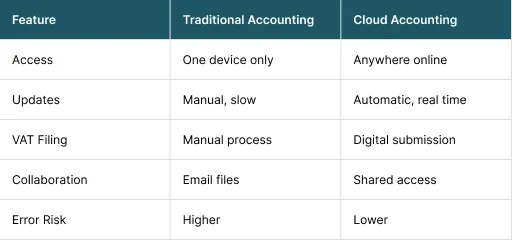
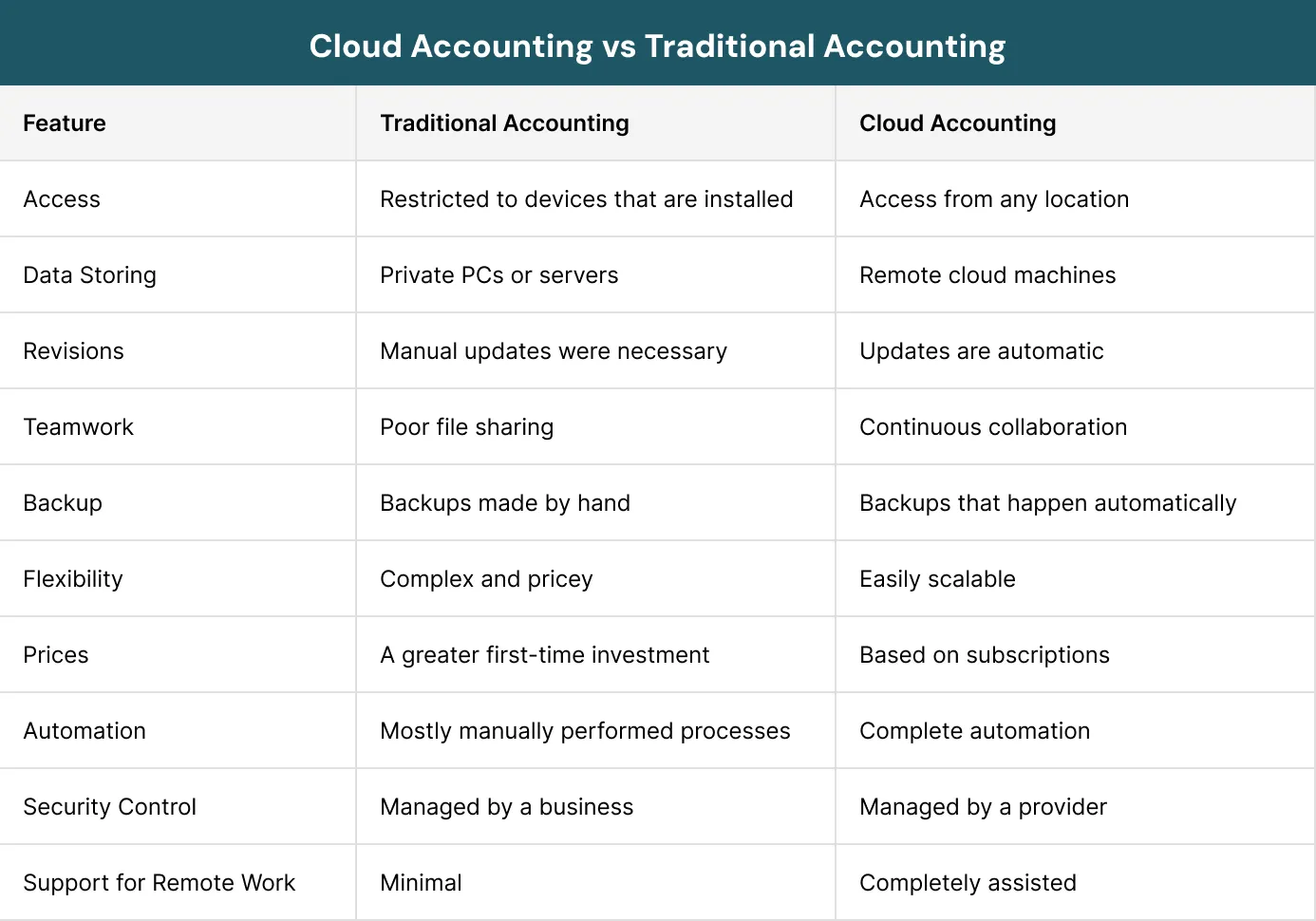
Compare Cloud Accounting vs Traditional Accounting
Firms are better able to make decisions when they are aware of the gaps between these systems.
Cloud Accounting vs Traditional Accounting: Availability and Remote Operations
In cloud accounting vs traditional accounting, easy access to financial details is the main difference. Generally, traditional accounting setups are according to local organisations’ standards.
Therefore, for hybrid or remote teams, this system results in issues. Sometimes, you need to train your staff for local networks or specific PCs to access financial data.
Cloud based accounting solves these pitfalls. In this system, workers, accountants and business owners can work from anywhere. Whenever they want, they start working from home or from the office.
For UK firms, this versatility has become more vital as hybrid or remote working models continue to develop.
Cloud Accounting vs Traditional Accounting: Automation and Performance
Manual record keeping is a major part of traditional accounting. Many hours are needed to make reports, modify tables, check transactions and enter data. On the other hand, you can handle most of these tasks with the help of cloud based accounting.
Some examples of automation are given below:
- Tax forecasts
- Payroll handling
- Automated billing
- Cost grouping
- Live transaction syncing
- Automatic bank feeds
You can reduce human mistakes, save your time and improve efficiency with the help of automation.
Related: Bookkeeping tips
Cloud Accounting vs Traditional Accounting: Teamwork and Interaction
Teamwork is hard in traditional accounting systems. This is because files are shared manually through:
- Local networks
- USB drives
- Emails
Due to this setup, sometimes files become redundant.
If you want to access the same financial records at the same time, a cloud based accounting system is so beneficial. Also, your communications can become quicker if you work together in real time.
Besides this, accountants can work within the system instead of waiting for the users to manually submit the document.
Case Study: Shift to Cloud Accounting
Many UK firms have shared their knowledge of MTD via HMRC. This reveals how traditional accounting methods have moved to cloud based accounting systems.
Consider Tyr Ex Ltd, which is a garage business in Durham. After 35 years of manual bookkeeping, it started to change its accounting process. When they moved to the digital system, they found minimum time was spent on VAT returns. In addition, they also find it less stressful to manage HMRC filings.
In this case study, HMRC’s MTD has helped the firm make the shift from traditional accounting to cloud based accounting. The major benefits were improved teamwork, faster reporting, better quality and easy VAT payment.
Why It Matters!
Choosing between cloud accounting vs traditional accounting affects cost, speed, compliance, and how easily your business can grow in the UK market.
Final Thoughts
The setup you must pick will depend on your final objectives, working style and business needs. When you compare cloud accounting vs traditional accounting, both have their own perks.
The firms that prefer full in house control and offline access should go with traditional accounting. While in cloud accounting, you can use its features of live access, scaling, automation and greater ease of use. This makes it the best option for the modern firms of the UK.
A cloud accounting system is becoming a more practical and viable solution for all sizes of firms. This is because digital work is growing and HMRC is moving further toward MTD compliance. With the help of this process, you can improve teamwork and reduce manual tasks.
It is also helpful for firms to have better visibility over their finances.
At Sterling Cooper, we know the UK trade’s changing demands. It provides cloud based accounting services that help with budgeting, accuracy and efficiency.
If you want to upgrade your accounting system or want to switch to the cloud, contact us now.
Struggling to choose between cloud accounting vs traditional accounting for your UK business?
We help you move from manual systems to smart cloud solutions that save time and reduce errors.
We guide setup, migration, and ongoing support for smooth financial management. Trusted by growing UK businesses across different sectors, we make accounting simple and compliant.
We have helped many firms improve efficiency and reporting accuracy. Contact us today to get started.
+443300102526
Book an Appointment
FAQs
What is traditional accounting?
Traditional accounting is a system where financial records are stored on local computers or paper files. It usually involves manual data entry and offline record keeping. Access to data is often limited to one place or device.
What is cloud-based accounting software?
Cloud-based accounting software is an online system that stores financial data on remote servers. It allows users to access accounts anytime using the internet. Data can be updated and shared in real time.
What are the benefits of cloud accounting?
Benefits of cloud accounting include real-time access to data, automatic updates, and easier teamwork. It also reduces manual work and helps improve speed and accuracy. It is flexible and can grow with your business needs.
What is the difference between cloud accounting and traditional accounting?
Cloud accounting stores financial data online and allows access from any device with internet. Traditional accounting stores data on local computers or paper and is usually accessed in one place. Cloud systems offer real-time updates, while traditional systems rely more on manual work and slower reporting.
Which accounting software is mostly used in the UK?
In the UK, cloud-based tools like Xero, QuickBooks Online, and FreeAgent are widely used. They are popular because they support Making Tax Digital (MTD) rules. Traditional desktop tools like Sage 50 are still used, but cloud software is now more common.
Share This Article!
Recent Posts
edit post
Budget vs Actual Reporting Explained
July 13, 2026
edit post
Why Cash Flow Problems Cause Profitable Businesses to Fail
July 9, 2026
edit post
Tax-Free Benefits Directors Can Claim
July 8, 2026