Blog

  • Monthly Management Accounts Checklist: Everything Your Business Needs to Stay on Track

    Monthly Management Accounts Checklist: Everything Your Business Needs to Stay on Track

    monthly management accounts

    Posted by:

    Admin

    Date:

    June 29, 2026

    Category:

    blogs

    Error: Contact form not found.

    Monthly Management Accounts Checklist: Everything Your Business Needs to Stay on Track

    Many business owners rely on the bank balance as their measure of financial health, but it is one of the least reliable ways to measure how a business is truly doing. The bank balance tells you what cash is sitting in your account right now. It says nothing about whether you are profitable, whether a big tax bill is coming or whether a supplier is quietly squeezing your margins.

    In fact, three in five UK small businesses have experienced cash flow problems yet most only review their finances once a year at filing time. By then, it is too late to act.  Monthly management accounts change that by giving you a clear, structured view of how your business is truly performing, not just a snapshot of today’s cash.

    If you have ever wondered what management accounts are and why so many growing businesses rely on them, the short answer is this: they help you make better decisions, avoid nasty surprises and stay in control of your finances throughout the year.

    Key Takeaways

    • Monthly management accounts provide a clear view of profitability, cash flow and business performance, helping you make informed decisions throughout the year rather than relying on year-end accounts alone
    • If you have ever wondered what management accounts are, they are regular financial reports that typically include a Profit and Loss statement, Balance Sheet and key performance indicators (KPIs) used to monitor business health
    • Effective accounts management helps identify risks early, including cash flow shortages, declining margins, tax liabilities and overtrading before they become serious problems
    • Understanding how to do monthly management accounts starts with a structured process that includes bank reconciliations, financial reporting, cash flow forecasting and KPI tracking
    • Knowing how to prepare monthly management accounts also means reviewing aged debtors and creditors, monitoring tax obligations and documenting key financial movements and variances
    • Tracking a small number of meaningful KPIs, such as gross margin, debtor days and payroll as a percentage of revenue, often provides more value than measuring dozens of metrics with no clear action plan
    • Consistent monthly reporting enables stronger budgeting, forecasting and business planning while giving lenders, investors and stakeholders greater confidence in your financial management

    What Are Management Accounts and Why Are They Important?

    Management accounts are financial reports produced for business owners, directors and senior managers. They are usually prepared quarterly or monthly and typically include a Profit and Loss report and a Balance Sheet. Unlike your statutory year end accounts which look backwards and are primarily for HMRC and Companies House, accounts management is designed to help you steer the business right now.

    Did You Know?

    A profitable business can still run out of cash if customers pay late.

    Think of it like driving a car. Your statutory accounts tell you where you have been. Your monthly management accounts tell you where you are going, how fast and whether there is something in the road ahead.

    Done well, they reduce surprises. They improve conversations about pricing, costs, cash and tax. They help you catch problems early before a small dip in margin turns into a serious cash crisis. Many small business owners only look at their numbers once a year at filing time. By then, it is too late to change anything. Monthly management accounts put you ahead of problems and give you time to act.
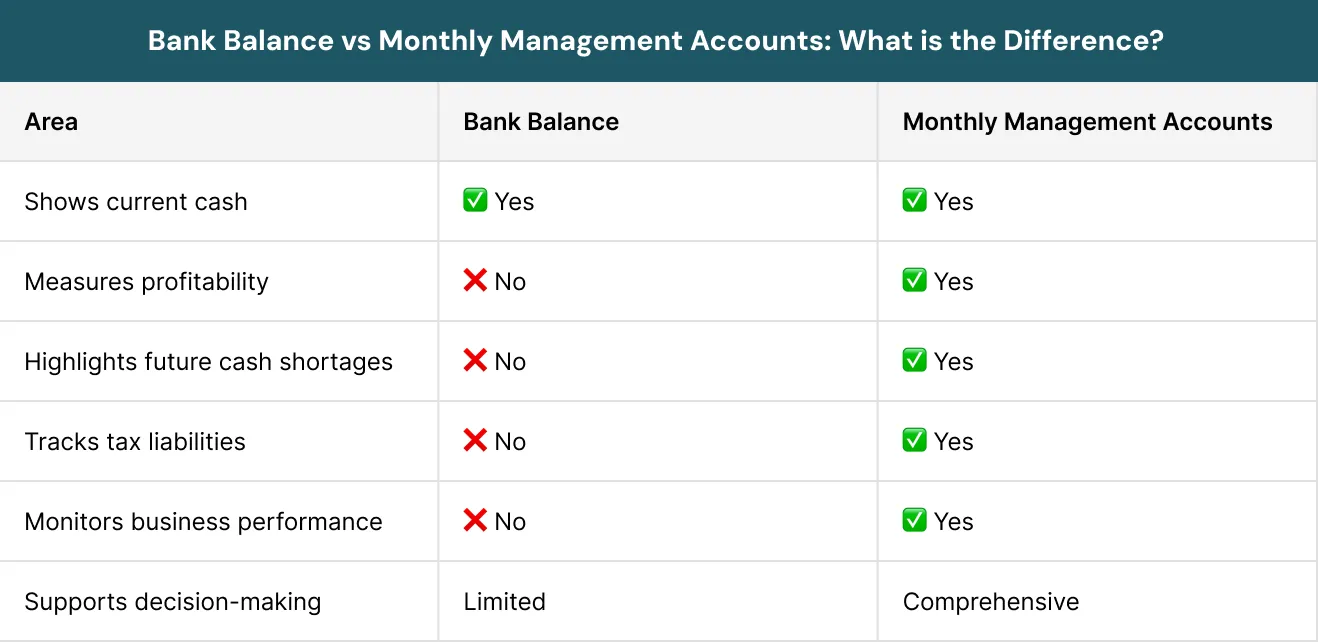
    Bank Balance vs Monthly Management Accounts What is the Difference

    Who Should Be Using Monthly Management Accounts?

    There is a common misconception that accounts management is only for large companies with finance teams. That is not true. Businesses of all sizes benefit from them.

    Small business owners use them to stay in control of their numbers. Accountants use them to give real time advice rather than reflecting on what happened twelve months ago. Banks and investors ask for them because they show that a business is well run and financially healthy.  Freelancers and sole traders can also benefit from monthly management accounts. A simple monthly management accounts summary helps you see which clients or services are most profitable and which ones are not worth the effort.

    In the UK, 98% of businesses have 20 or fewer staff members, yet only a small fraction of these have any form of regular accounts management in place. That is a significant gap. If you want to know where you stand financially and make decisions based on facts rather than intuition, monthly management accounts are worth the effort irrespective of your size.

    What Are the Benefits of Monthly Management Accounts?

    Before diving into the checklist itself, it is worth understanding what you actually get from putting this process in place. The benefits go well beyond simply knowing your numbers.

    1. Better Decision-Making

    When you face an important business decision like hiring someone new, dropping a product line or investing in equipment then you need an accurate and recent snapshot of your financial position. Making major decisions without that information is risky. Monthly management accounts give you the data to back your choices with confidence rather than hope.

    A good example is of an estate agency with three offices asking the owners to rank the branches by profitability. They gave their best guess. When there is proper accounts management, the ranking was completely different from what they had assumed. They had been making resourcing decisions based on entirely wrong information.

    2. Future Planning

    Robust monthly figures are invaluable for planning. Whether you are seeking investment, applying for a bank loan, budgeting for the year ahead or forecasting future performance, accounts management provides the foundation. Banks and investors would like to see an accurate financial overview before they commit. Internally, your monthly management accounts help you plan hiring, capital expenditure and operational activities with realistic expectations rather than wishful thinking.

    3. Cost Control

    Monthly management accounts give you clear visibility into both income and outgoings. You can see exactly where the company’s money is going and whether it is being spent wisely. This level of detail helps you identify areas where costs are creeping up, challenge spending that is not delivering value and make more informed choices about where to allocate your resources.

    4. Stronger Year-End Position

    When you track your monthly management accounts throughout the year, year-end holds no surprises. You will not receive an unexpected tax bill you cannot cover, nor will you celebrate a good year while quietly panicking about what it means for your tax position. Your records will be up to date, your accountant will have better information to work with and the whole year-end process will be faster, smoother and less expensive.

    5. VAT and Compliance Protection

    Monthly management accounts help you keep track of your rolling VATable sales, VAT threshold and registration requirements. If your taxable turnover is approaching the VAT registration threshold, you will know well in advance rather than discovering you should have registered months ago and now face penalties. The same applies to PAYE and other compliance obligations. Staying on top of these monthly management accounts removes the risk of costly surprises.

    6. Avoiding Overtrading

    One of the less obvious but very serious risks for growing businesses is overtrading and expanding sales so quickly that the business runs out of money before customers pay. Suppliers and staff demand payment on time, but customers may not have settled their invoices yet. This is a common cause of business failure and almost always comes as a shock to the owner. Monthly management accounts highlight the risk early so that corrective action can be taken before it is too late.

    What Does a Monthly Management Accounts Checklist Include?

    A good monthly management accounts checklist brings structure to your month end process. It ensures nothing is missed, your records are accurate and your reports are ready in time to be useful. Here is what a thorough checklist should cover.
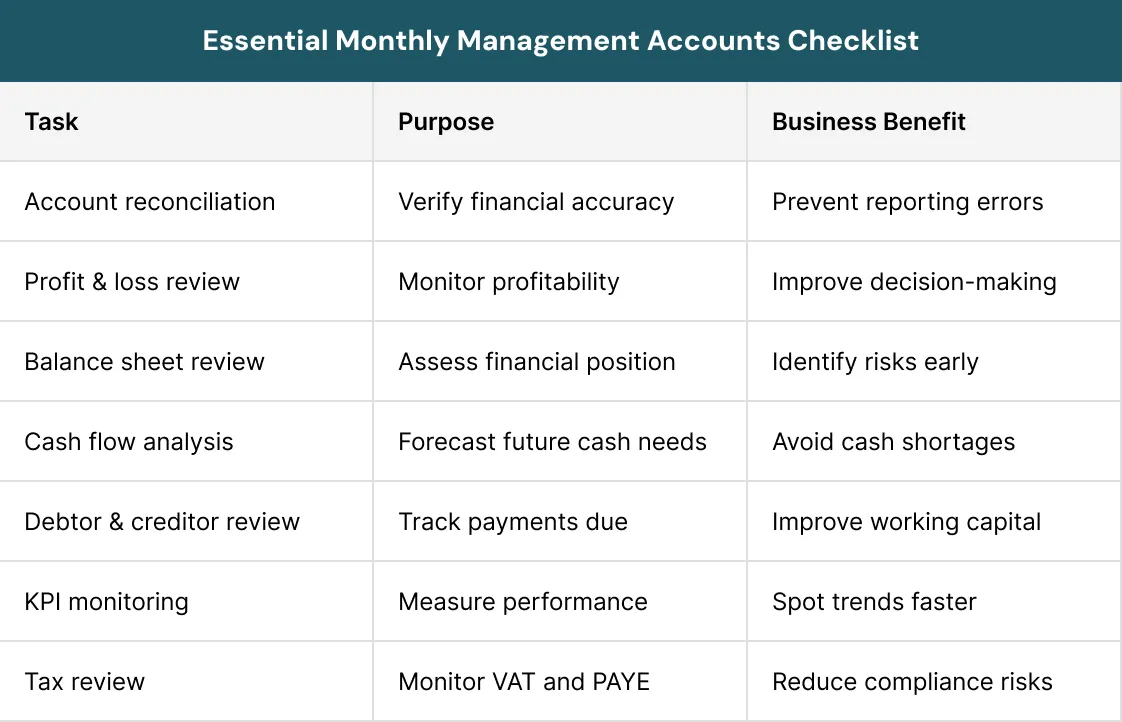
    Essential Monthly Management Accounts Checklist

    1. Account Reconciliation

    This is the starting point. Compare your bank and credit card statements to your internal records and identify any discrepancies. A bank reconciliation is absolutely essential and you must be able to prove that the numbers match. Without it, every report you produce could be based on incorrect data, which means every decision you make from those reports could be wrong.

    Also reconcile your VAT and PAYE accounts. These are often skipped, but they matter. Using VAT or PAYE funds to cover day to day trading is one of the clearest warning signs that a business is in financial difficulty.

    2. Profit and Loss Statement

    Prepare a Profit and Loss (P&L) statement for the month and for the year to date. Comparisons should be made on the basis of budgets and actuals of the previous year. This allows you to to identify the variances and raise the relevant questions, like:

    • What caused the increase in expenses?
    • What caused the short-fall in revenues?
    • What must change next month?

    The P&L tells you whether the business is making money and where that money is going. It is not the same as a cash report. Profit and cash are different things and confusing the two is one of the most common financial mistakes small business owners make.

    3. Balance Sheet Review

    The balance sheet shows what your business owns and owes at a point in time. Review your assets, liabilities and equity each month. Pay particular attention to movements on key accounts such as debtors, creditors and any director loan accounts.

    The balance sheet is a health check for your overall financial position. It tells you whether you are solvent, whether liabilities are growing and whether the business has the financial stability to keep trading and investing.

    4. Cash Flow Analysis

    Even profitable businesses can run into serious trouble if cash flow is tight. Review cash inflows and outflows for the month and update your rolling cash flow forecast. Ideally, this forecast should look at least 12 months ahead, with 24 months considered good practice. Ask yourself: 

    • What will cash look like over the next 30 to 90 days if nothing changes?
    • Are there large payments coming up like VAT, payroll, loan repayments that need to be planned for?

    Spotting a potential shortfall two months in advance gives you time to act. Spotting it when the account is empty does not. 90% of UK businesses faced late payments in 2025, with the average payment delay standing at 32 days.

    Quick Tip:

    One late-paying customer can create a cash flow problem for an otherwise healthy business.

    5. Aged Debtor and Creditor Reports

    Pull an aged debtor report and review any invoices that are outside your payment terms. Slow paying customers are a major cause of cash flow problems and the longer you leave a debt, the harder it becomes to collect.

    Similarly, review your creditor position. If you are stretching supplier payments to manage cash, this is a risk that needs to be visible and monitored. Where any assumptions are made about stretching creditors, note them clearly in your accounts.

    6. Key Performance Indicators (KPIs)

    KPIs give you a quick view of how the business is performing without needing to dig through every line of the accounts. The right KPIs depend on your business, but the most commonly useful ones include:

    • Gross margin percentage and trends by product or service line
    • Debtor days and the proportion of invoices outside terms
    • Payroll as a percentage of revenue
    • Revenue per employee
    • Overheads run rate
    • Order book, pipeline coverage and conversion rates
    • EBITDA

    The goal is not to track everything. The goal is to track the signals that make you act. Agree which KPIs matter for your business and keep them consistent for at least six months so that trends become visible.

    7. Tax Obligations Review

    Check that all tax liabilities like VAT, PAYE and Corporation Tax are accurately calculated and scheduled for payment. One practical step is to create a dedicated tax reserve line in your accounts so that these funds are not accidentally spent on day to day operations.

    If your business has loan covenants, review compliance as part of this step. Report on both actual and forecast covenant compliance. A breach can have serious consequences, including the lender demanding full repayment, so early visibility is critical.

    8. Document Revisions

    Update all financial documents and records with the latest information. This keeps your records audit ready and ensures that anyone reviewing the accounts, whether internally or externally is working from accurate and current data. If your accounting treatment differs in any way from your year end policies, the document explains this clearly.

    9. Management Review and Action Planning

    The numbers alone do not run your business. What matters is what you do with them. Bring key stakeholders together to review the management accounts each month. Use the session to ask the right questions:

    • What changed this month and what is driving it?
    • Which customers or products are most and least profitable?
    • Where are we exposed to a single point of failure; one customer, one supplier or one key person?
    • What is the one decision we should make this month to reduce risk or improve results?

    Add a one page action log with named owners and due dates. Without accountability, reviews become a talking shop.

    Which KPIs Should You Be Tracking?

    Different sectors have different drivers, but some KPIs repeatedly predict problems or opportunities across most business types. Gross margin is one of the most important. Most businesses do not track it closely, but it deserves serious attention.

    On annual sales of £500,000, a 1% improvement in gross margin adds £5,000 to net profit. A 10% improvement in margin delivers the same profit impact as a 10% increase in sales often with far less effort. Tracking margin trends month by month, broken down by product or service line where possible, gives you the insight to take action before profitability erodes.

    Interesting Fact:

    A small increase in gross margin often boosts profit more than a similar increase in sales.

    How Do You Know If Your Margins Are Healthy?

    Here is a simple example. Suppose you sell a product for £10 with a gross margin of 25%. If you cut your price by 10% to win more sales, you need to sell 66% more units just to make the same profit. If instead you raise the price by £1, you can sell almost 30% fewer units and still come out ahead. Many business owners instinctively reach for price cuts when sales slow down. Monthly management accounts help you see whether that is actually the right move or whether a price increase would serve you better.

    What Should the Monthly Commentary Include?

    Numbers tell part of the story. Commentary tells the rest. A good management accounts commentary does not need to be long, but it does need to be clear. Avoid lengthy blocks of text, unexplained jargon and relying entirely on graphs without explanation.

    A useful commentary explains what changed and why, highlights key variances against budget and prior year and sets out any risks or issues that need attention. Where there is significant uncertainty about the year end position, set out a range of scenarios, best case, worst case and base case so that decision makers can plan accordingly.

    A short one to two page summary at the front of the pack, covering the main points in plain English, is often the most effective approach.

    How Often Should You Produce Management Accounts?

    Monthly management accounts are the standard for most businesses. Quarterly reporting may work for very small or straightforward operations, but it reduces your ability to catch problems early. Management accounts should be available within 15 working days of the month end. The longer you wait, the less useful they become. Stale information does not help you make timely decisions.

    What Happens When You Skip the Checklist?

    Without a structured monthly process, businesses end up making financial decisions in the dark. They do not know their true profitability, which parts of the business are performing or what cash will look like in six weeks.

    One particularly dangerous outcome is overtrading where a business expands sales too quickly and runs out of money before customers pay. This is a common cause of business failure and almost always comes as a shock to the owner. Regular accounts management would have flagged the risk early enough to act.
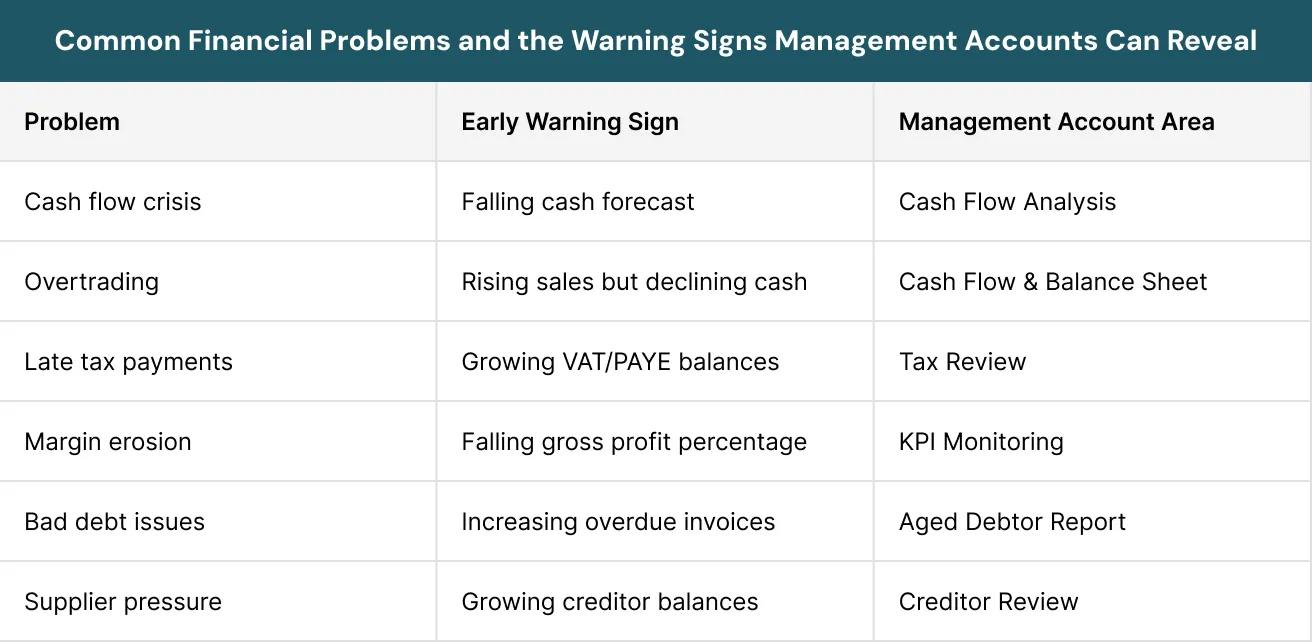
    Common Financial Problems and the Warning Signs Management Accounts Can Reveal

    How Does Accounts Management Help You Plan for the Future?

    Regular accounts management supports every aspect of business planning. Banks and investors will ask for management accounts before agreeing to fund or invest. Having up to date, professional reports demonstrates that your business is well managed and financially credible.

    Internally, your monthly figures provide a reliable basis for budgeting, forecasting and operational decisions such as hiring or capital investment. They also put you in a stronger position at year end.

    When you have been tracking your finances throughout the year, there are no surprises. Tax planning is easier, your accountant has better information to work with and the year end process costs less time and money.

    What are the Practical Steps to Get Your Monthly Reporting Right?

    If your current reporting is inconsistent or late, start simple and build from there. The key is consistency. Here is how to set yourself up properly:

    • Agree a monthly management accounts closing date and stick to it
    • Document your month end process clearly so nothing is missed
    • Agree which KPIs matter and keep them stable for at least six months
    • Create a tax reserve line so VAT, PAYE and Corporation Tax are never accidentally spent
    • Add a one page action log with owners and deadlines to every monthly management accounts review
    • Use accounting software such as Xero or QuickBooks to automate as much as possible
    • Work with an accountant who can fine tune your reports, highlight what matters and explain what the numbers actually mean

    Monthly management accounts are not a luxury reserved for large businesses. They are a practical tool that any business can use to understand its finances, make smarter decisions and plan for sustainable growth. The businesses that use them consistently are the ones that spot problems early, seize opportunities quickly and build on solid financial foundations.

    Read more about sustainable growth: Accounting Practices for Sustainable Growth

    Real Life Example

    A UK-based construction firm managed to increase its annual sales turnover from £700,000 to £5 million within a short time period. From an accounting perspective, the company seemed to be extremely successful. But it faced a very serious cash flow problem due to the considerable period between project completion and customer payments.

    During this time, the firm continued to incur liabilities in the form of outstanding supplier invoices, wages to its own workers and subcontractor invoices. Finally, it ran out of overdraft facilities and found it hard to cover its financial commitments. It turned out that overtrading was the reason for all the problems that the company encountered. Although the contracts were profitable, the firm did not have enough working capital for further expansion.

    This particular case shows precisely how monthly cash flow forecasting and balance sheets could detect the arising problems. Companies can take appropriate measures well before they get into serious trouble.

    Never take your eye off the cash flow because it’s the lifeblood of business. – Sir Richard Branson, Founder of Virgin Group.

    Conclusion

    Running a business without monthly management accounts is like flying blind. You might feel like things are going well based on what is in the bank or how busy the team seems, but without the full picture, you leave the business exposed to risks that could have been spotted and addressed far sooner.

    A structured monthly management accounts checklist gives you control. It ensures:

    • Your records are accurate
    • Your cash flow is visible
    • Your margins are tracked
    • Your decisions are based on real information rather than assumptions.

    It keeps tax obligations in check, flags problems early and puts you in a strong position whether you are seeking funding from your bank, planning next year’s budget or simply trying to understand where your profit is going.

    The businesses that thrive are not always the ones with the highest sales. They are the ones that understand their numbers, act on them quickly and build good financial habits from the start. Whether you are a sole trader reviewing a simple monthly management accounts summary or a growing company producing a detailed management pack for your board, the principle is the same; if you can measure it, you can improve it.

    Always start with the basics, maintain consistency and consult a good accountant that will be able to interpret all these figures for your next step. Once you have developed a reliable process every month, you will never know how you were running the business before.

    Sterling Cooper knows that most business owners do not need financial reports. They need insights that help them make better choices. Our management accounting and business advisory services give you financial information on time including cash flow prediction and performance analysis. Contact us today to keep your business on track and support long term growth.

    Are you making business decisions with a full picture of your finances?

    Sterling Cooper helps businesses improve cash flow visibility, profitability and financial control through expert management accounting and advisory support. Contact us today to find out how we can help your business grow with confidence.
    +443300102526
    Book an Appointment

    FAQs


    What is a monthly management account?

    A monthly management account is a set of financial reports prepared each month to help business owners monitor performance, profitability, cash flow and financial health. It typically includes a Profit and Loss statement, Balance Sheet and key performance indicators (KPIs).

    Present monthly management accounts in a clear, structured format with a summary of key findings, financial statements, KPI trends and actionable insights. Include comparisons against budgets, previous periods and forecasts to highlight important changes.

    Examples of management accounts include Profit and Loss statements, Balance Sheets, cash flow forecasts, aged debtor reports, aged creditor reports, budget variance reports and KPI dashboards.

    Account management is the process of monitoring, maintaining and improving financial records, customer accounts or business relationships to support informed decision-making, operational efficiency and long-term growth.

    Management accounts are prepared regularly for internal decision-making and business planning, while financial accounts are annual statutory reports prepared primarily for regulators, tax authorities and external stakeholders.

    Monthly management accounts should include a Profit and Loss statement, Balance Sheet, cash flow analysis, KPI reporting, aged debtor and creditor reports, tax liabilities review and management commentary explaining key financial trends.

    Monthly management accounts help businesses identify financial issues early, improve cash flow management, monitor profitability and make informed decisions based on up-to-date financial data rather than assumptions.

    Share This Article!

    Recent Posts

  • Corporation Tax Deadlines Every Director Should Know

    Corporation Tax Deadlines Every Director Should Know

    corporation tax deadlines

    Posted by:

    Admin

    Date:

    June 25, 2026

    Category:

    blogs

    Error: Contact form not found.

    Corporation Tax Deadlines Every Director Should Know

    Do you know when your next corporation tax deadline is? Missing even one key date could result in penalties from HMRC and create avoidable problems for your company.

    HMRC shows that UK firms are required to comply with strict rules regarding payments and filings for Corporation Tax. This will result in penalties and interest charges automatically.

    No company director can overlook the importance of corporation tax deadlines. You must meet your deadline for filing the corporation tax return even when there is no tax to pay. The penalties and interest may still be imposed by HMRC regardless of the size of the company and its profits.

    Key Takeaways

    • Corporation Tax deadlines apply to all UK limited companies.
    • Payment and filing dates are different and must both be tracked.
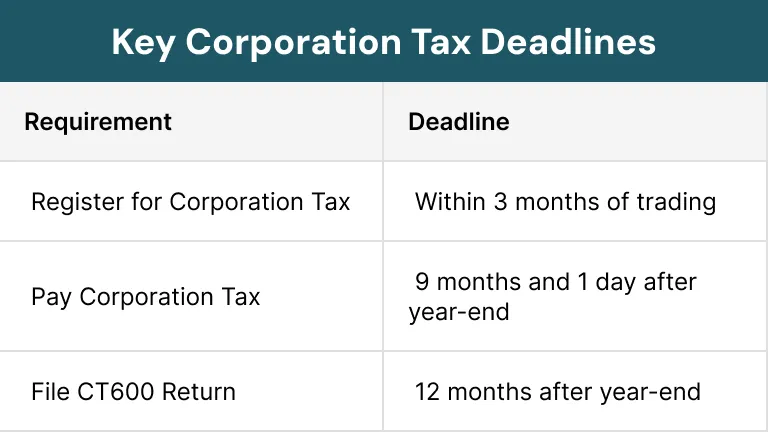
    • Corporation Tax is usually paid 9 months and 1 day after year-end.
    • Company Tax Returns (CT600) are due 12 months after year-end.
    • Missing deadlines can lead to automatic HMRC penalties and interest.
    • Directors are responsible for compliance, even if an accountant is used.
    • Good planning and bookkeeping help avoid last-minute issues.

    What Are Corporation Tax Deadlines?

    In the UK, corporation tax deadlines are based on your company’s accounting period. There are two distinct deadlines you must meet, which are the payment deadline (which comes first) and the filing deadline (which comes later).
    Key Corporation Tax Deadlines

    Why Should Directors Know Corporation Tax Deadlines?

    Directors must understand corporation tax deadlines to be on the right side of the law. If you miss these tax deadlines, it can lead to high penalties as well as unnecessary stress. It can also affect the efficiency of your entire tax process.

    Corporation Tax Payment Deadlines Every Director Should Know

    One of the important corporation tax dates that every director should know is the payment deadline. This is dependent on the company’s financial year-end date, according to HMRC. Failure to make the payments will lead to interest and fines. Early planning helps avoid last-minute cash pressure. To understand these deadlines better, directors should know how the payment date works and how to prepare for it.

    1. Corporation Tax Payment Dates

    Corporation tax payment dates are typically calculated based on a company’s financial accounting period, which is usually 9 months and 1 day after the end of the accounting period. This applies to all UK limited firms. The HMRC considers the date of the year-end when determining the due date for tax payments. This timeframe gives businesses enough time to prepare for their tax payments.

    2. Corporation Tax Payment Planning

    Directors should plan for corporation tax by setting aside some money specifically for tax purposes. This will help them track all deadlines that HMRC sets throughout the year. The process will ensure they do not stress when deadlines are close. If payment becomes difficult, directors can contact HMRC to discuss time to pay corporation tax arrangements. In the UK, deadlines are determined by the end of the company year.

    3. Simple Example of a Corporation Tax Payment Deadline

    If the accounting period ends on 31st March, then the tax payment is due on 1st January. This shows how the time period between year-end and payment is calculated. Directors must plan ahead to deal with this issue.

    Quick Reminder

    Corporation Tax is usually payable before the Company Tax Return filing deadline.

    Corporation Tax Deadlines For Filing Returns

    Filing a return is a vital part of corporation tax deadlines that all directors should know. If you just pay the corporation tax, then it is not enough. You need to file a complete return with HMRC as well. If you fail to do this, it may lead to penalties even if taxes are paid.

    Paying corporation tax is not the only requirement, as firms should also submit a return to HMRC. To avoid fines, directors should understand the filing deadline, the details required in the return, and the effects of filing late.

    1. Corporation Tax Filing Deadline

    The deadline to file a corporation tax return is within 12 months of the end of its accounting period. In this case, the form known as the CT600 should be delivered to HMRC. This happens regardless of whether any tax needs to be paid.

    2. Information Included in a CT600 Return

    A CT600 return includes the company’s income, expenses, allowable costs, and the final tax amount due. This will help HMRC to ensure that the correct amount of tax is paid. The details must match the accounts of the company.

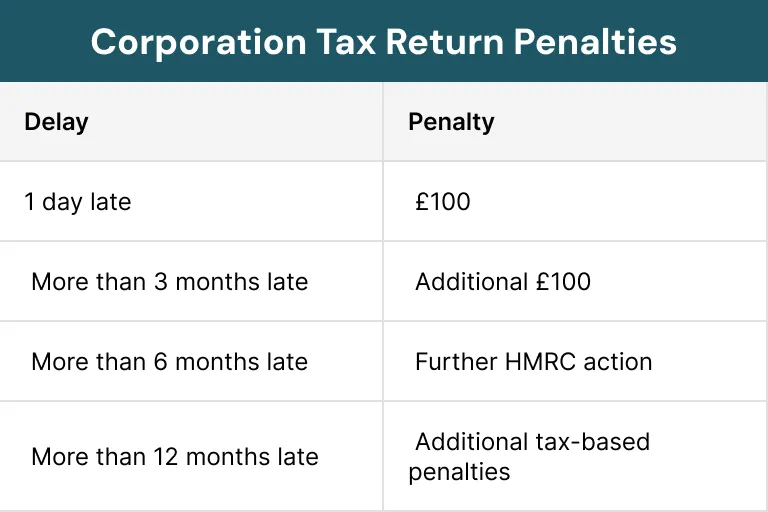
    3. Penalties for Late Filing

    Filing late leads to a £100 fine. Further delays will cause additional fines. Delays that are extended can result in increased penalties from HMRC. It can increase the total cost too. Continued delay can lead to higher penalties and further HMRC action.

    Corporation Tax Return Penalties

    Corporation Tax Deadlines For Companies Paying By Instalments

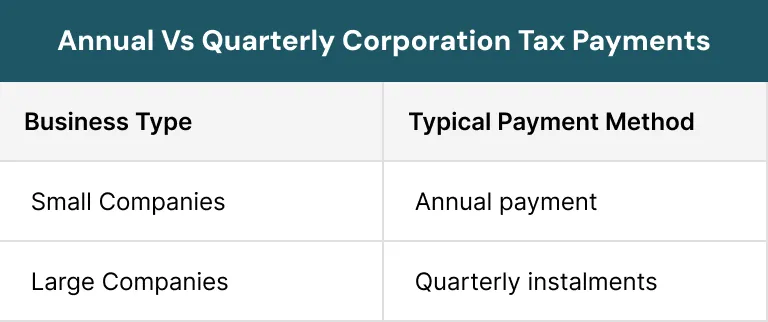
    There is no annual deadline for corporation tax payments for all businesses. As for large companies, they can make the payments throughout the year. The size of their profits and other regulations will decide how often they do this. Most smaller businesses make one payment per year. But some businesses follow different rules. To understand how instalment payments work, it is important to know the deadlines and the companies that follow these rules.

    1. Quarterly Corporation Tax Deadlines

    Quarterly corporation tax deadlines are instalment payments made four times a year. The schedule is set by HMRC for big firms. Each payment represents a part of the total annual tax due. These quarterly tax deadlines help spread tax costs.

    2. Companies That Pay Corporation Tax Quarterly 

    Large companies usually follow instalment rules. This applies when profits go above HMRC limits. Payments are split across the year instead of one lump sum. It helps manage high tax amounts.

    3. Small Companies and Instalment Rules

    Large firms normally operate under the instalment rule. This happens whenever profit exceeds the limits of HMRC. It is done by splitting the payments throughout the year rather than making a one-off payment. It keeps the tax process simple and fixed.

    Annual Vs Quarterly Corporation Tax Payments

    How Can Directors Stay Ahead Of Corporation Tax Deadlines?

    Corporation tax deadlines do not need to be stressful if directors plan ahead. Directors can ensure that there is no issue with paying taxes because there are a number of simple things they can do. The following steps can help directors stay compliant:

    1. Keep Accounting Records Up To Date

    Updated records will increase accuracy and save time in doing tax work. It will help reduce errors in calculations and report generation. Updated records make it easy to file taxes at the end of the year.

    2. Use Accounting Software And Tax Reminders

    Software helps track all important dates and tasks. It reduces manual effort and missed steps. Directors can be reminded about all the deadlines coming up. The quarterly tax deadlines could also be tracked through alerts if needed.

    3. Review Key Dates Before Your Year-End

    Early review helps to properly plan cash flow. There is no unexpected strain on payments. Directors will have sufficient funds available before the payment deadline

    4. Work Closely With Your Accountant

    Accountants advise on rules and deadlines. They ensure that there is proper filing and payment. But it is a must for the directors to comply with the regulations. This ensures that tax duties are manageable.

    “The responsibility for filing accurate returns and paying tax on time rests with the company,”

    HMRC

    Case Study: Apex Ltd

    Apex Ltd is a software company operating in the UK. Its accounting period is from 1 April 2025 to 31 March 2026. This example shows how corporation tax deadlines work in practice.

    The deadline for the corporation tax payment is 1 January 2027, i.e., 9 months and 1 day after the end of the financial year. The deadline for submitting the CT600 form is 31 March 2027.

    The directors misunderstood both of those deadlines. They believed that both deadlines were the same, which resulted in the corporation paying taxes 3 months late.

    HM Revenue and Customs charged interest for not paying taxes by their deadline. This shows how missing the deadline for filing corporate tax returns or the payment date can increase costs.

    Conclusion

    Every UK Limited Company is required to make corporation tax payments on time. It is vital that not only the dates by which payment should be made but also the deadline for filing are monitored and followed carefully. Non-compliance with such deadlines may bring fines from HMRC. Effective planning and record-keeping will ensure directors are able to comply without problems. Sterling Cooper Consultants helps helps businesses stay compliant through expert tax advice and compliance support.

    Struggling with unclear financial data each month?

    Many UK SMEs face the same challenge. Strong management reporting improves financial visibility, supports better decisions, and helps businesses stay in control of their finances. If you are facing these issues, get in touch today to see how the monthly management reporting can help grow your business.
    +443300102526
    Book an Appointment

    FAQs


    What Are Monthly Management Reports?


    Monthly management reports are structured documents that summarize a company’s financial and operational performance over a specific 30-day period. They provide decision-makers with a consistent, timely overview of business health, allowing them to track Key Performance Indicators (KPIs), assess budget adherence, and make informed strategic adjustments.


    Monthly management reports are vital for growing businesses because they provide a timely, data-driven snapshot of financial health. Rather than waiting for annual tax returns, these regular updates help owners monitor cash flow, track key performance indicators (KPIs), and adjust strategies before minor issues escalate.


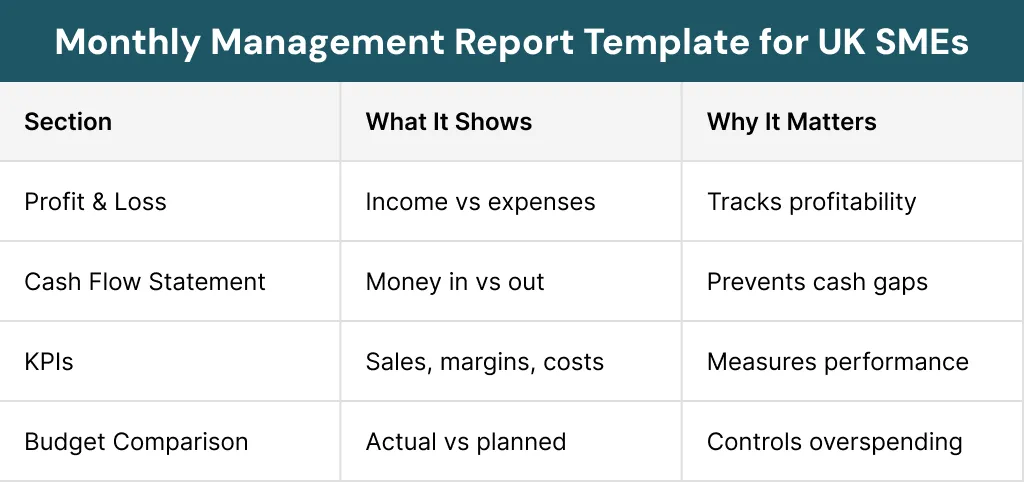
    A monthly management report is an internal tool that summarizes a company’s financial and operational performance over the past 30 days. It typically includes an executive summary, core financial statements (P&L, cash flow, balance sheet), key performance indicators (KPIs), budget tracking, and actionable recommendations for the upcoming month.


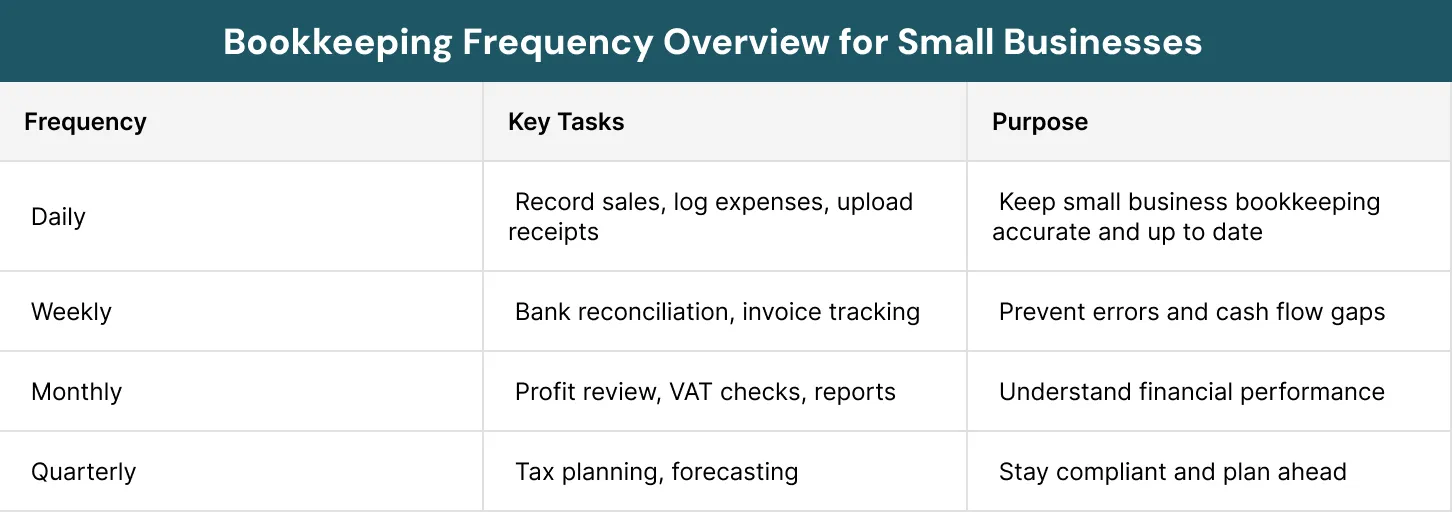
    Management reports should be reviewed on a tiered schedule depending on the data type: daily/weekly for operational metrics (like sales or cash flow), monthly for comprehensive financial and strategic reviews, and annually for high-level governance. This cadence ensures timely course corrections without overwhelming leadership.


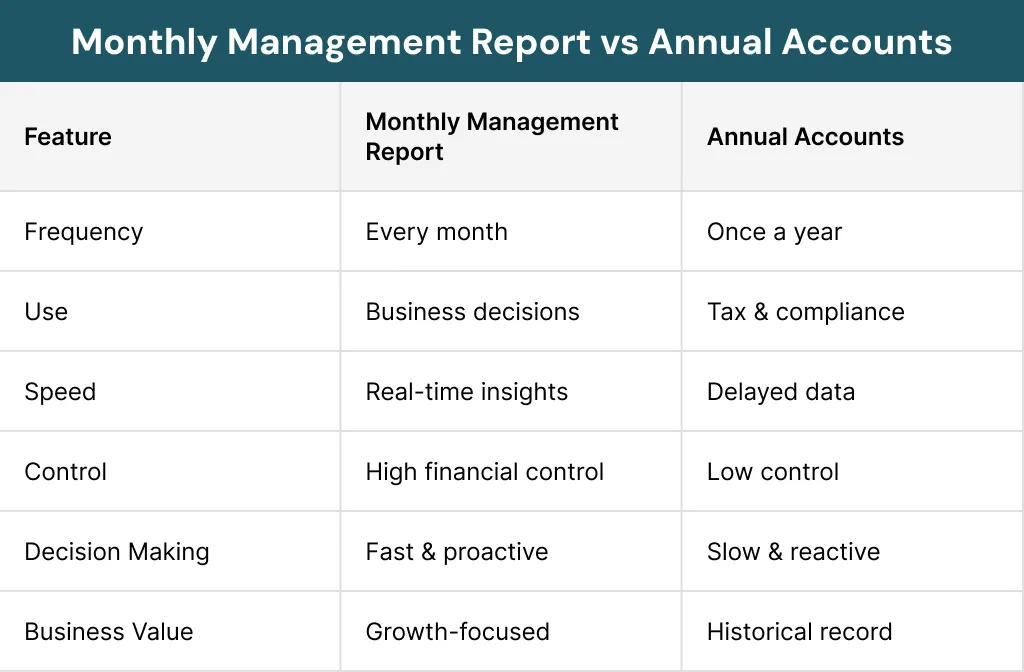
    Monthly management reports are generally better for day-to-day business operations and proactive decision-making than annual accounts. While annual accounts are essential for tax compliance and legal filings, they arrive too late to guide business strategy. Monthly reports provide timely financial visibility and control.

    Share This Article!

    Recent Posts

  • Xero vs QuickBooks: Which Is Better for UK Businesses?

    Xero vs QuickBooks: Which Is Better for UK Businesses?

    xero vs quickbooks

    Posted by:

    Admin

    Date:

    June 24, 2026

    Category:

    blogs

    Error: Contact form not found.

    Xero vs QuickBooks: Which Is Better for UK Businesses?

    Running a business in the UK means you will soon bump into the Xero vs QuickBooks debate. Both platforms rule the cloud accounting market for solid reasons. Loaded with features and working on any device, they make handling finances a breeze. Over 70% of UK SMEs now use cloud accounting. This shows how fast digital adoption has grown.

    So you want to know what is best for your business in the Xero vs QuickBooks debate. The truth is that it depends on your business. This guide will help you decide which one is right for you. It will show you what you need to think about to make a choice, for your business.

    Key Takeaways

    • In the Xero vs QuickBooks comparison, both platforms offer strong cloud accounting features, but the best choice depends on your business size, industry and operational requirements
    • When evaluating QuickBooks vs Xero, QuickBooks stands out for inventory management, CIS returns, and customer support, while Xero excels in usability, integrations and unlimited users
    • The Xero accounting software vs QuickBooks decision should consider how closely you work with your accountant, as Xero remains the preferred platform among many UK accounting firms
    • For businesses focused on UK compliance, Xero vs QuickBooks UK comparisons show that both platforms support Making Tax Digital (MTD) requirements and HMRC-approved reporting
    • Understanding Xero vs QuickBooks cost is essential, as Xero’s higher pricing may offer better value for larger teams due to unlimited user access across all plans
    • The cost of Xero vs QuickBooks should be assessed alongside the features you need, including payroll, multi-currency support, reporting and third-party integrations
    • Before committing, take advantage of each provider’s free trial to test workflows, usability and automation features against your specific business needs

    What Is the Background of Xero and QuickBooks?

    Understanding the history behind each platform provides useful context for the QuickBooks vs Xero comparison.

    Xero was started in New Zealand by Rod Drury and Hamish Edwards in 2006. They made Xero from scratch as a cloud based solution. This was a great deal because most accounting software was still on desktops at that time. Xero was different because it was built specifically for the cloud. That heritage matters which means Xero was designed for the internet era from day one, not retrofitted into it. Today, it has over 4.6 million people who subscribe to it from around the world. This also includes more than 300,000 businesses in the United Kingdom.

    QuickBooks is a product of Intuit. Intuit is a company from America that was started in 1983 by Scott Cook and Tom Proulx. Intuit had a lot of success with a tool called Quicken that people used to manage their finances. Then they started making accounting tools for businesses.

    Now QuickBooks is the popular accounting software in the United States with more than 5 million people using it all around the world. If you are in the United Kingdom there is something you should know about QuickBooks. The company stopped making the desktop version of QuickBooks for people in the UK in 2023.

    Now the only version of QuickBooks that people in the UK can get is QuickBooks Online. When you compare Xero and QuickBooks you see they have both improved a lot.

    What Do Xero and QuickBooks Both Offer?

    Before we get into the differences in this quickbooks vs Xero comparison, understanding the shared features is an important first step in any Xero vs QuickBooks comparison, including:

    • Cloud based access from any device
    • Income and expense tracking
    • Custom quotes and invoices
    • Bank reconciliation
    • Advanced financial reporting
    • Mobile apps
    • Help in Making Tax Digital (MTD) for VAT and Income Tax (ITSA)
    • Bookkeeping tools that uses AI

    On the AI front, Xero has launched JAX (Just Ask Xero) for automated transaction categorisation and cashflow forecasting. QuickBooks has its Intuit Intelligence feature doing similar work, with a more powerful Finance Agent available on the top tier Advanced plan.

    Both of these are approved by HMRC for MTD compliance. This is something that businesses will have to do from April 2026 if they earn more than £50,000. The MTD compliance is going to be mandatory for these businesses.

    Interesting Fact:

    Both Xero and QuickBooks offer mobile apps, allowing business owners to send invoices, capture receipts and monitor cash flow on the go.

    Xero vs QuickBooks Pricing: What Will You Actually Pay?

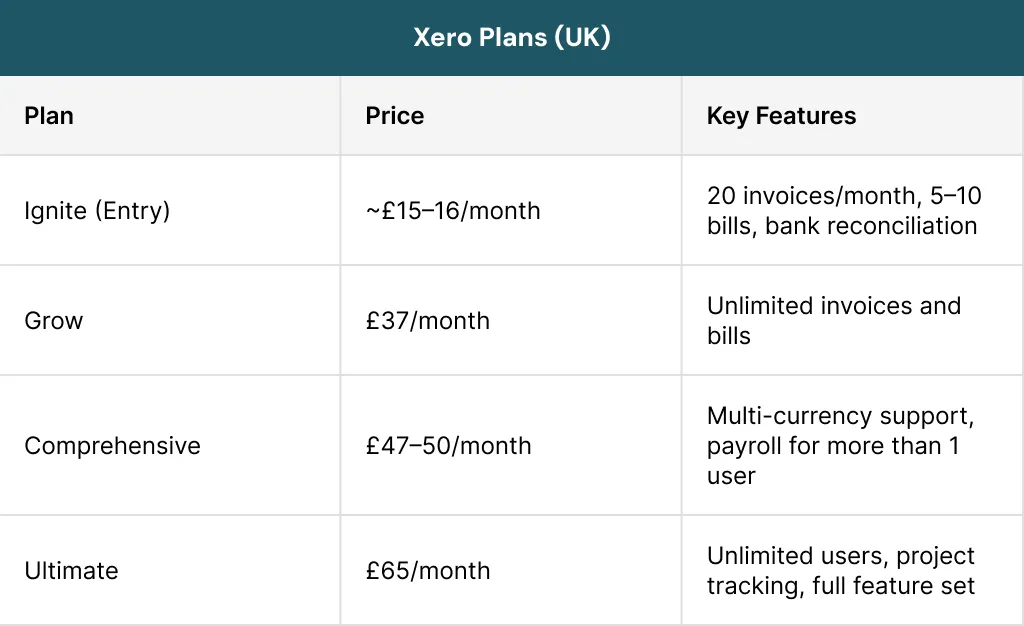
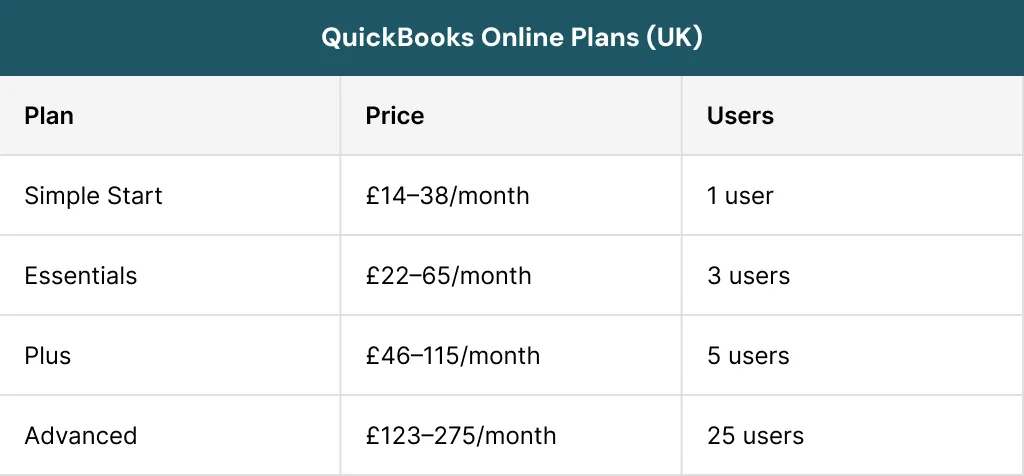
    Pricing is one of the biggest differences in the Xero vs QuickBooks debate. Here is how they currently compare for UK users.

    Xero Plans UK
    Xero increased its prices noticeably in 2024-25.Their Grow plan went from £26 to £37 a month. Previously, their Standard plan was at £15 per month which is now replaced by the Ignite plan. They hiked the prices again in October 2025.
    QuickBooks Online Plans UK

    QuickBooks has a Sole Trader plan which costs about £10 per month. This makes QuickBooks the cheapest way for people who are self-employed in the United Kingdom to do their accounts.

    The cost of using QuickBooks is going up. The price of the Plus plan went up by more than 64% between the year 2020 and 2025. The reason for the price increase is because of features that use artificial intelligence as defined by QuickBooks. These new features are part of the QuickBooks Plus plan.

    The key pricing difference is that Xero allows unlimited users on all plans. QuickBooks restricts users per tier. If you have a team of more than five or six people, then Xero will probably be the cheaper option overall.

    What are the Key Features of Xero and QuickBooks?

    Now look at why the Xero vs QuickBooks comparison is really useful. First of all, we should go through some important features one by one.

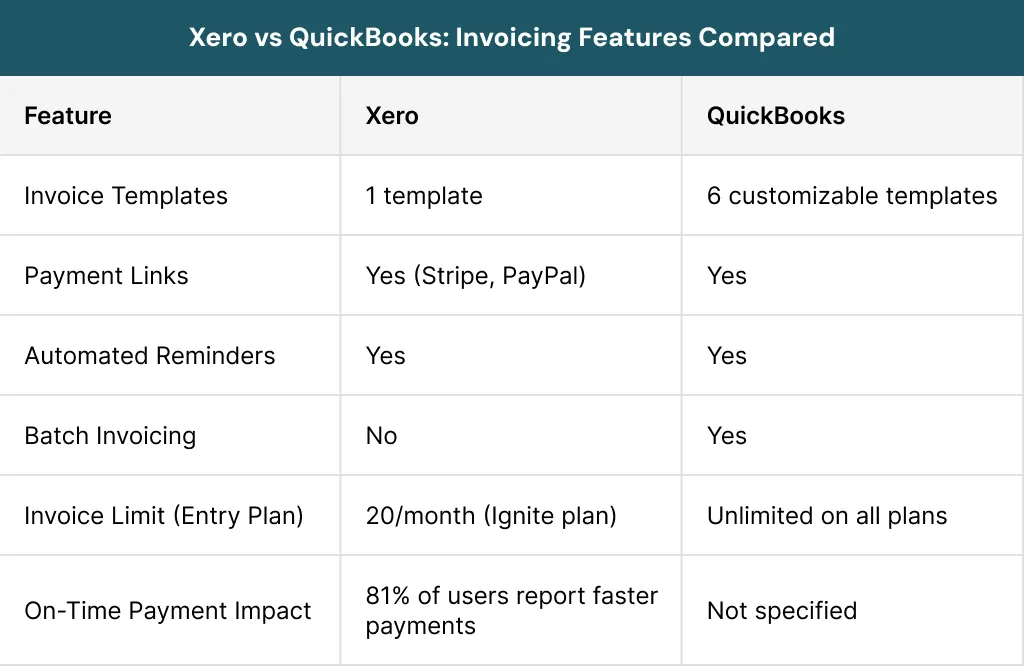
    1. Invoicing

    When it comes to the process of invoicing, there is no doubt that both Xero and QuickBooks are great tools for professional billing and faster payments.

    Xero vs QuickBooks Invoicing Features Compared

    QuickBooks leads if you need lots of design flexibility and high invoice volumes. But Xero wins if you want fast payments with less follow up needed.

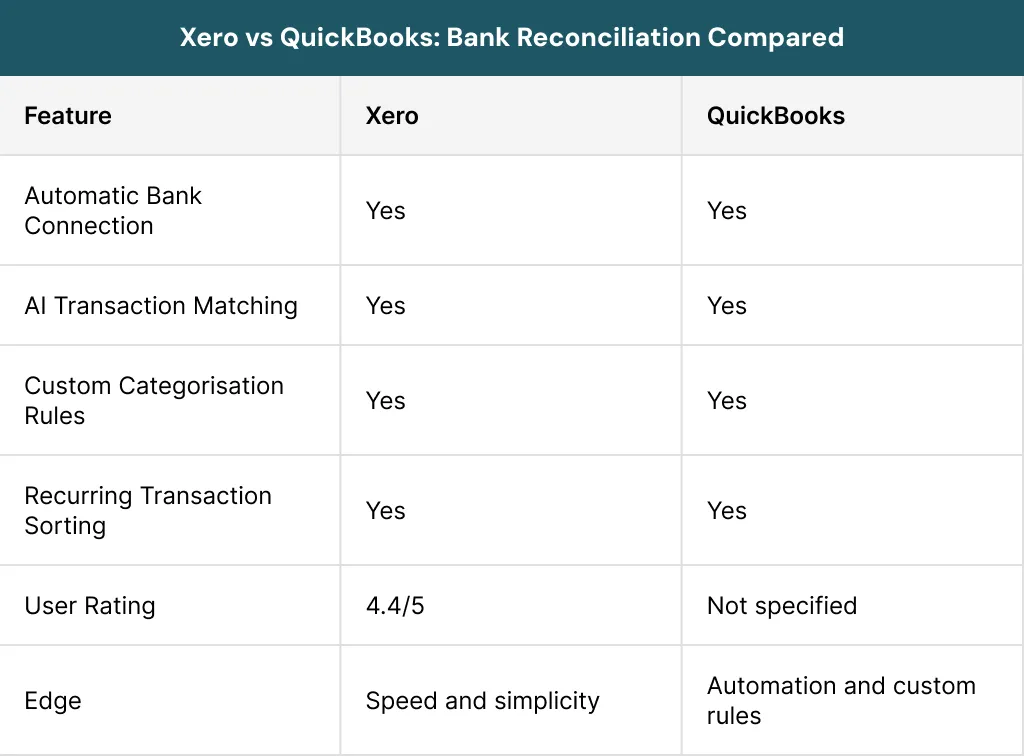
    2. Bank Reconciliation

    Bank reconciliation is one of those tasks that can eat up hours of your week if you are doing it manually. Thankfully, both Xero and QuickBooks take most of that work off your plate by connecting directly to your bank and pulling in transactions automatically. Both platforms use smart automation to keep your books accurate and up to date. Automation makes them strong contenders when comparing Xero accounting software vs QuickBooks in this area.

    Xero vs QuickBooks Bank Reconciliation Compared

    Both platforms handle bank reconciliation very well, but Xero gets a slight edge for speed and ease of use in day to day reconciliation.

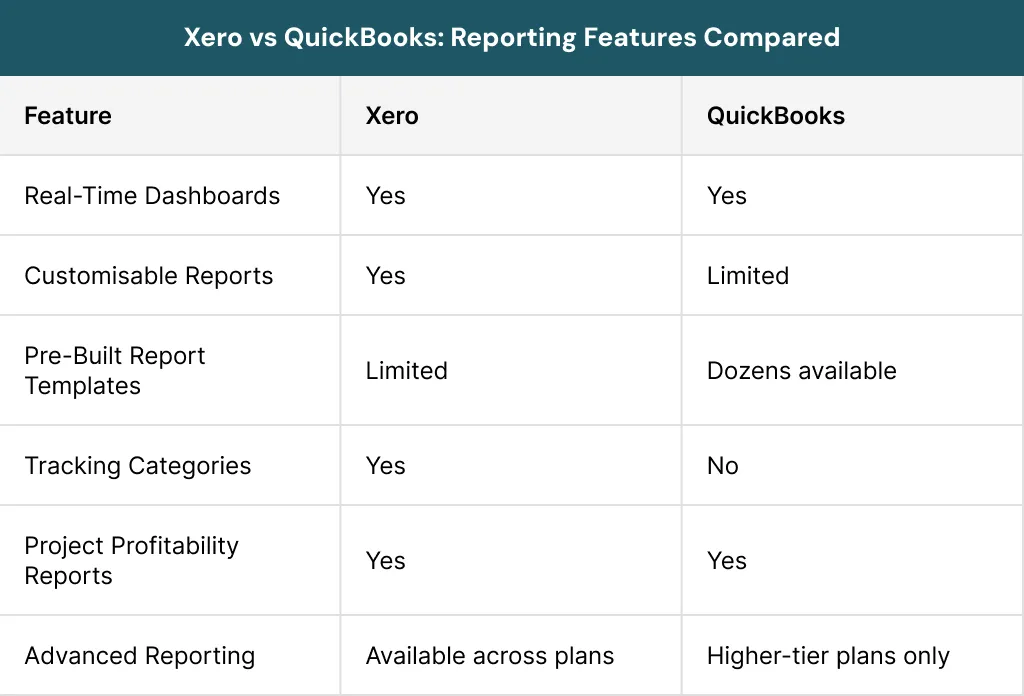
    3. Reporting

    Good reporting gives you a clear picture of how your business is performing. Xero and QuickBooks both offer great reporting tools, but in different styles. Xero is all about flexibility; you can create reports tailored to your needs. QuickBooks, on the other hand, goes for preset templates, making it super easy to start right away.

    Xero vs QuickBooks Reporting Features Compared

    Xero is great if you want something flexible and customizable. QuickBooks works best for people who prefer ready to use templates without the need to customise.

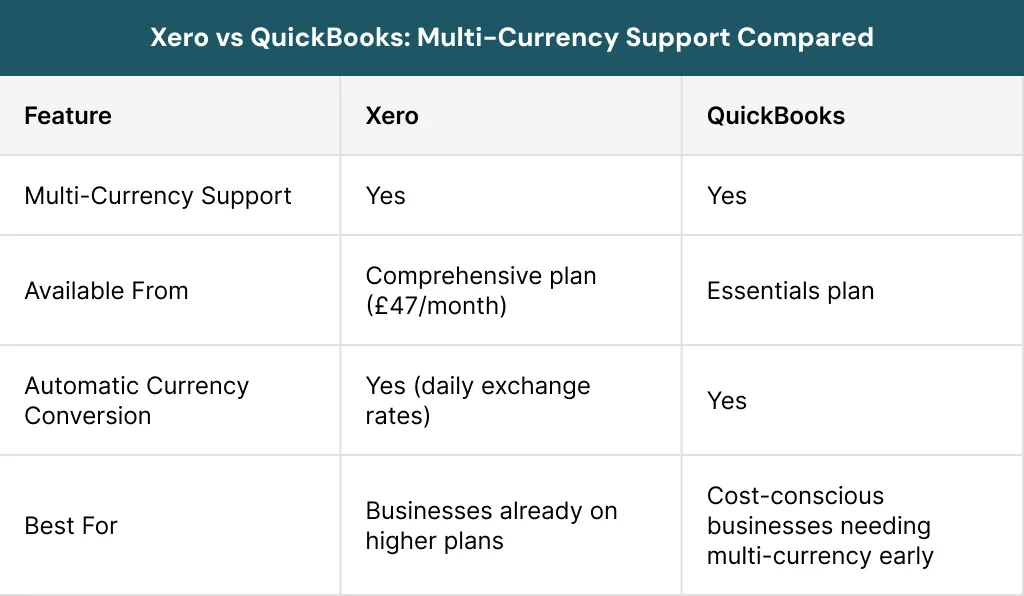
    4. Multi Currency Support: Xero vs QuickBooks

    If your business trades internationally, having reliable multi currency support is not a nice to have but it is essential. Xero and QuickBooks both have this feature, but their plans unlock it at different price points. It depends on your team size and budget, so one might end up being way cheaper than the other.

    Xero vs QuickBooks Multi-Currency Support Compared

    QuickBooks makes multi currency more accessible at a lower price point. Xero’s automatic daily exchange rate conversion is a handy feature, but you’ll need to be on a pricier plan to use it.

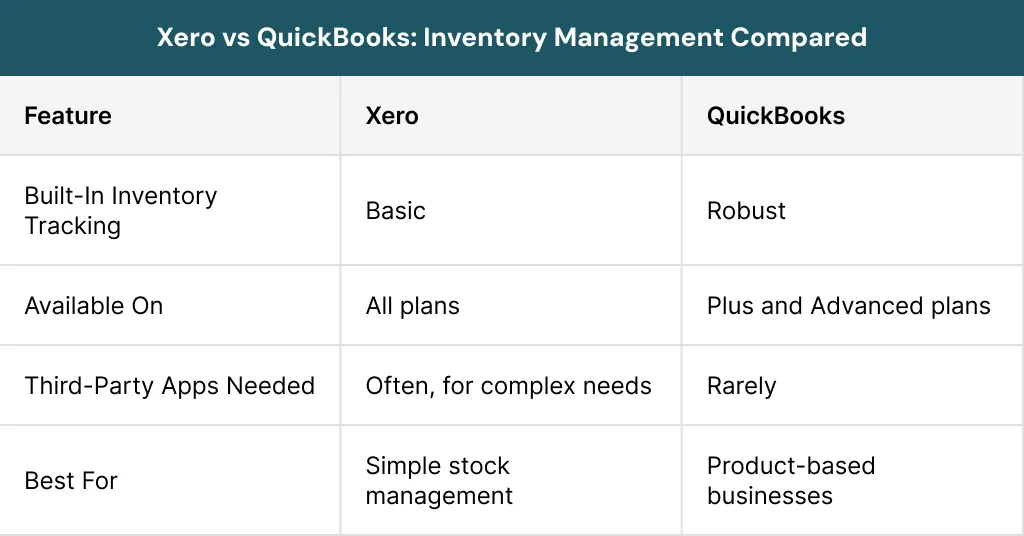
    5. Inventory Management

    For product-based businesses, inventory features often become a deciding factor in the QuickBooks vs Xero debate.Both platforms offer inventory tools, but the gap between them is quite noticeable. If inventory management is a core part of your operations, this section could be the deciding factor in your Xero vs QuickBooks decision.

    Xero vs QuickBooks Inventory Management Compared

    QuickBooks is the clear winner for inventory management. Xero can handle the basics, but growing product based businesses will likely need to integrate a third party app.

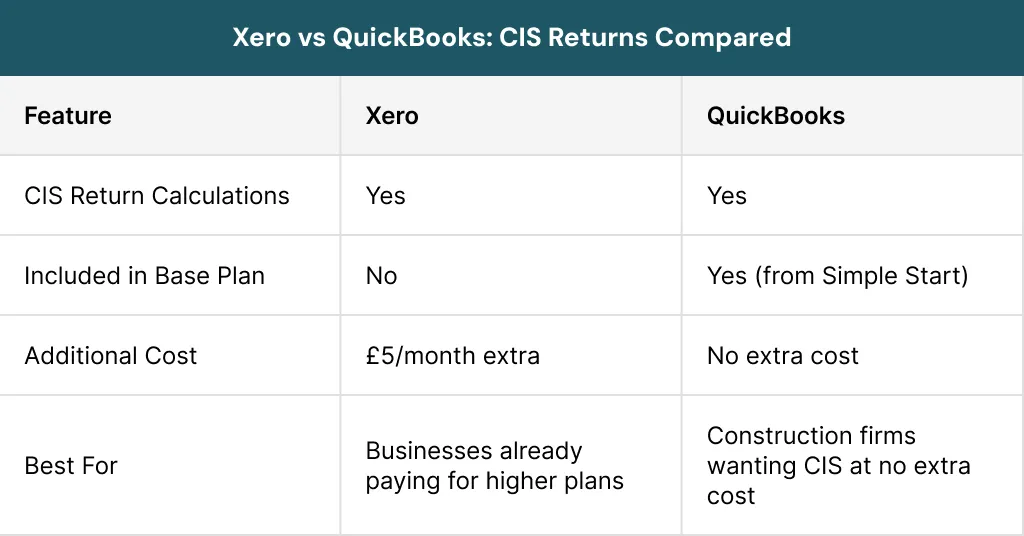
    6. CIS Returns

    For construction businesses, Construction Industry Scheme (CIS) compliance is a non-negotiable part of running the books. This is one area where the two platforms take very different approaches and it could have a real impact on your monthly costs.

    Xero vs QuickBooks CIS Returns Compared

    If you are in the construction industry, QuickBooks gives you CIS returns from its most basic plan at no extra charge. With Xero, you will pay an additional £5 per month regardless of which plan you are on.

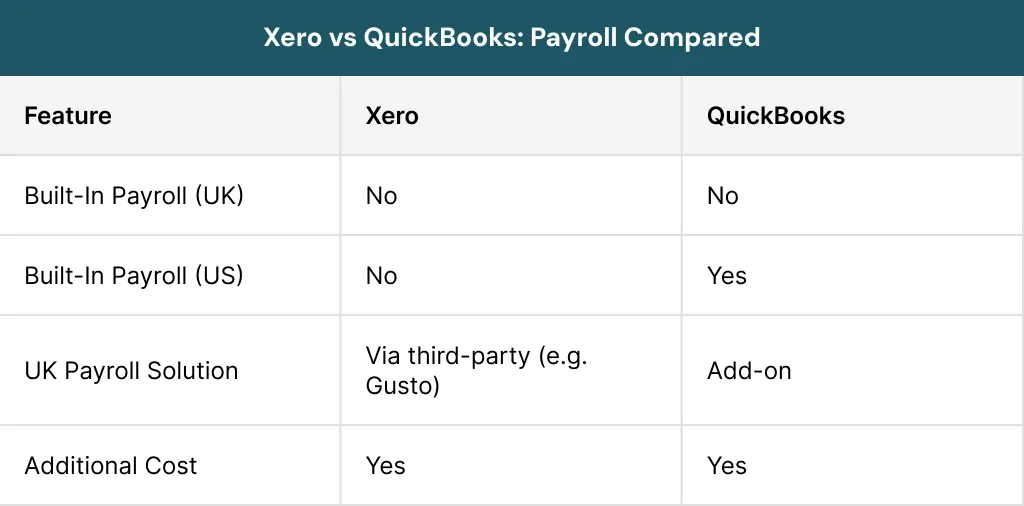
    7. Payroll

    Payroll is something every business with employees needs to get right. Neither platform makes it free for UK users, but they do handle it differently and knowing this upfront helps you budget accurately.

    Xero vs QuickBooks Payroll Compared

    Neither platform includes free payroll for UK businesses, so factor in the added cost whichever way you go. QuickBooks has a built in solution for US users, while Xero relies on third party integrations like Gusto for payroll functionality.

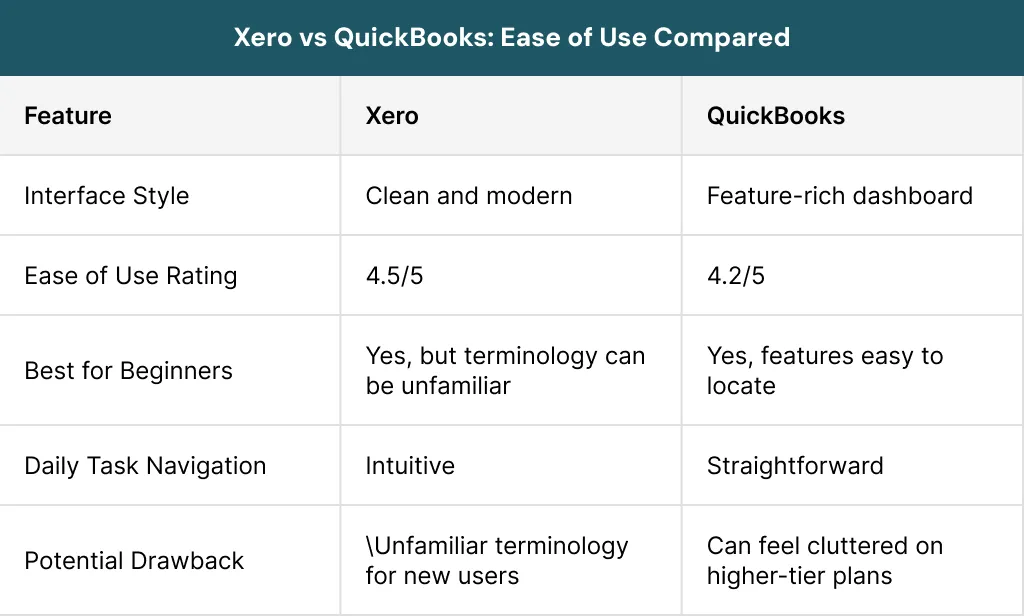
    How Easy Is It to Use Xero and QuickBooks?

    Usability is another key factor when comparing Xero vs QuickBooks. Ease of use can make or break your experience with accounting software, especially if you are not a numbers person. When comparing Xero accounting software vs QuickBooks from a usability point of view, both platforms have their strengths. It really comes down to what kind of experience you prefer. Xero favours a clean and minimal design while QuickBooks puts everything front and centre on the dashboard.

    Xero vs QuickBooks Ease of Use Compared

    Xero edges ahead on overall ease of use but QuickBooks makes it easier to find features quickly. If you are brand new to accounting software, either will work but just expect a small learning curve with both.

    Xero vs QuickBooks: Which Has Better Integrations and Apps?

    The ability to connect your accounting software with the other tools you use daily can save you a huge amount of time. In the Xero vs QuickBooks integration race, both platforms offer a wide range of third party connections. There is still a clear gap in terms of volume and openness. The right integration ecosystem is really important, for your e-commerce connection, your payroll tool and your Customer Relationship Management system.

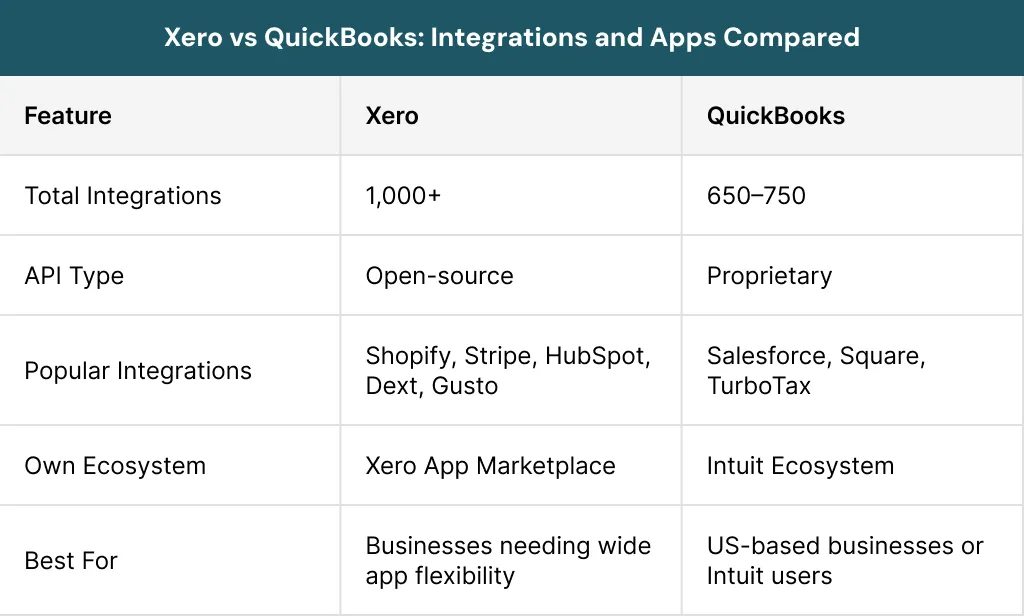
    Xero vs QuickBooks Integrations and Apps Compared

    While evaluating Xero accounting software vs QuickBooks, Xero is ahead when it comes to integrations. Its open API also makes it more flexible. This is really helpful for businesses that have specific needs. They can easily connect Xero to tools. QuickBooks delivers solid functionality, but its ecosystem truly excels for businesses using Intuit products or based in the US.

    Which Platform Offers Better Customer Support?

    Support quality can significantly influence your Xero vs QuickBooks decision. You want to know that you can get help when you need it. If something goes wrong with your accounts, you do not want to be waiting for an email reply. The way they handle customer support is very different. How quickly you can get help with QuickBooks or Xero can really affect how well your business runs every day.

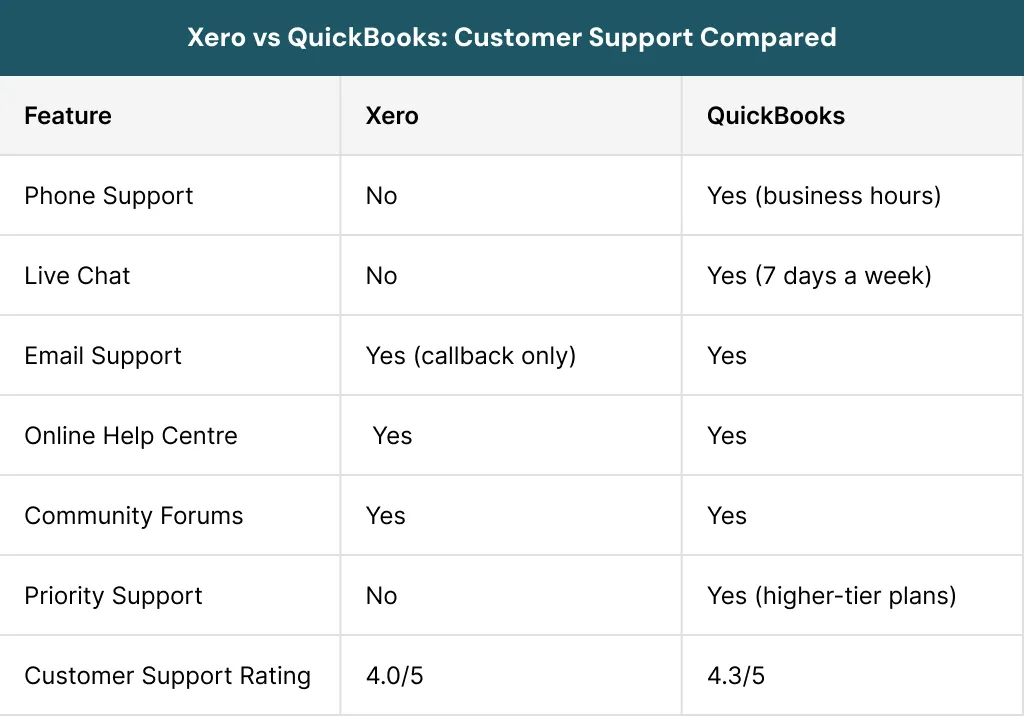
    Xero vs QuickBooks Customer Support Compared

    QuickBooks wins when it comes to customer support. If you want to talk to a person right away, QuickBooks is a better option. Xero has some self service resources, but many users get frustrated because they cannot call or chat with someone live. QuickBooks is more reliable, in this case.

    Xero vs QuickBooks: Which Platform Is More Secure?

    When it comes to your financial data, you really need to think about security. It is not something you can ignore. The good news is that Xero and QuickBooks take security seriously. They both have protections in place. Xero uses one approach and QuickBooks uses another. You can be confident that your data is safe, with either one.

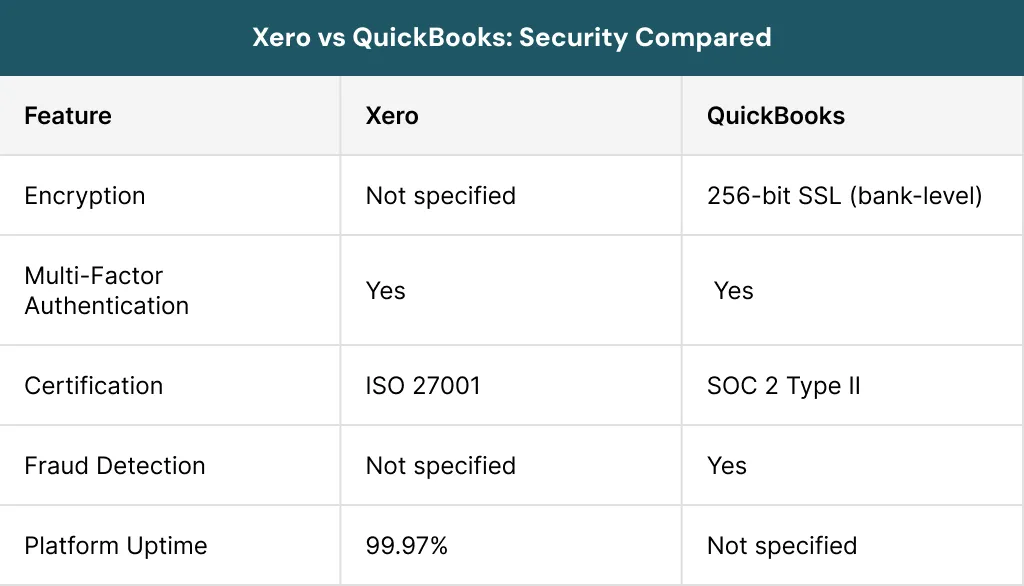
    Xero vs QuickBooks Security Compared
    Xero and QuickBooks are both very secure. They get certified in different ways. Xero has something called ISO 27001 certification. It is running almost all the time with 99.97% uptime, which is really good. On the other hand, QuickBooks has very strong bank level encryption and it can detect fraud, which makes it a great choice for businesses that need to be very secure.

    Did You Know?

    Most data breaches happen because of weak passwords, which is why enabling two-factor authentication is essential regardless of which platform you choose.

    Which Accounting Software Do UK Accountants Prefer?

    This is an important factor when deciding Xero vs QuickBooks for your business. The majority of UK accounting practices are Xero certified, making Xero the dominant choice in UK professional workflows. If your accountant already uses Xero, collaboration will be smoother.

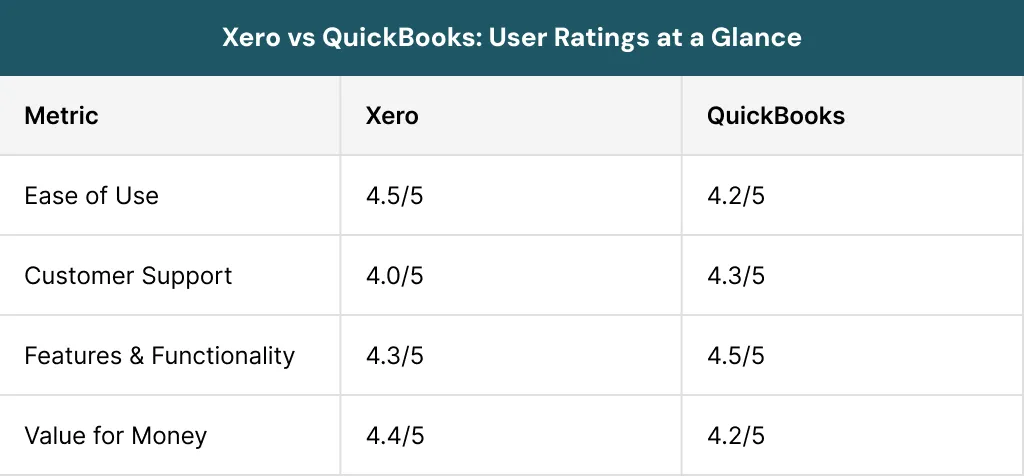
    Xero vs QuickBooks User Ratings at a Glance
    QuickBooks is popular and holds a strong second position in the UK. It is the clear leader in the US market and rules the US rather than the UK.

    Quick Tip

    Always check which accounting software your accountant prefers before choosing a platform – it can save time and reduce year-end headaches.

    What Is Sage and FreeAgent: How Do They Compare?

    While the Xero vs Quickbooks debate covers most UK small businesses, it is worth knowing that other options exist. Sage and FreeAgent both have their place in the market and depending on your situation, one of them might actually be worth a look alongside the big two.

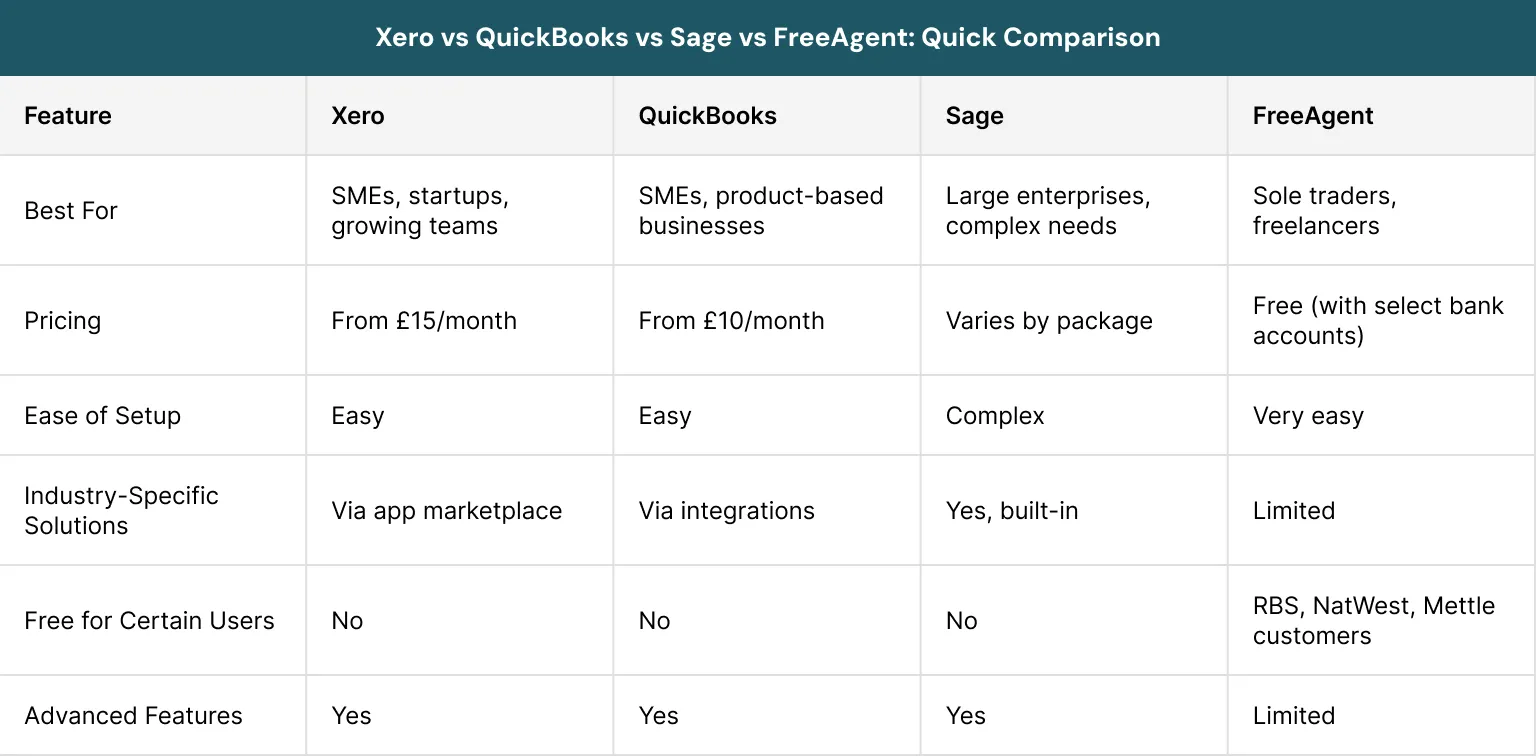
    For most small to medium sized UK businesses, the Xero vs QuickBooks decision is the right place to focus. Sage suits larger enterprises with complex requirements, while FreeAgent is a great no cost starting point for sole traders and freelancers banking with RBS, NatWest or Mettle.

    In the United Kingdom, people who do payroll and accounting will be using products in February 2026. Xero is the one that most people use, with 45.11% of the money being spent on Xero. This is more than QuickBooks, which has 17.78% and Sage, which has 13.19%. This shows that Xero is the choice for payroll and accounting in the UK and lots of people use it.

    Xero vs QuickBooks vs Sage vs FreeAgent Quick Comparison

    In the UK payroll and accounting market in February 2026, Xero was leading with 45.11% spend share. Xero was ahead of QuickBooks which had 17.78% share and Sage which had 13.19%. This confirms that Xero is really dominant in the UK.

    Accounting is the language of business.

    – Warren Buffett, Chairman and CEO of Berkshire Hathaway.

    Xero vs QuickBooks: Which Should You Choose?

    If you have been trying to decide between QuickBooks and Xero, the below points should help you make a decision that is right for you.

    Choose Xero if:

    • You have a growing team and need multiple users without paying extra
    • You work closely with a UK accountant (most prefer Xero)
    • You want a clean, modern interface and strong customisable reporting
    • Your business operates internationally and needs multi currency support
    • You want the largest app marketplace for third party integrations
    • You are a sole trader or small business looking for an intuitive platform

    Choose QuickBooks if:

    • You need phone and live chat support and don’t want to rely on email
    • You run a product based business needing advanced inventory management
    • You are in construction and need CIS returns without paying extra
    • You are self employed and want the most affordable compliant option (Sole Trader plan)
    • You need advanced reporting and automation out of the box
    • You manage a large volume of transactions or complex projects

    Real Life Example

    King of Shaves, a brand that makes shaving and skincare products, asked BookCheck to help them simplify their accounting system. They wanted to save a lot of money. Their old accounting and stock management software was too complicated and costly. So they decided to switch to a cloud based solution. They chose Xero as their accounting platform.

    One of their headaches was sorting out Amazon payments and sales. This was really hard to do with their system. When they connected Xero to the A2X app, the problem went away. The sales data got put together automatically and matched to their bank transactions. This saved them six hours every month of reconciliation work. King of Shaves was happy with the change to Xero and A2X. They were able to focus on their business.

    Conclusion

    In the Xero vs QuickBooks comparison, we have found out that both are excellent platforms. Xero and Quickbooks are not better than each other in every way. They are just good for different types of businesses. When you are trying to decide between Xero and Quickbooks, you have to think about:

    • How many people are on your team?
    • What features do you really need?
    • How much support do you want?

    Xero is really good in user experience, integrations with other programmes, unlimited users and UK accountant preference. QuickBooks wins on customer support, inventory tools, CIS inclusion and value for sole traders. Ultimately, the right QuickBooks vs Xero choice depends on your business goals and workflows.

    The good news is that both offer a 30-day free trial. The best thing you can do is try the one that sounds most like a match for your needs and see how it turns out in practice. Your business finances are too important to pick software blindly but with everything covered above, you are in a much better position to make the right call.

    Sterling Cooper understands that picking the right accounting software can feel overwhelming, especially when both platforms have so much to offer. Our team can assess your business needs and recommend the best fit whether that is Xero, QuickBooks or something else entirely. Contact us today and let us make the decision simple for you.

    Struggling with unclear financial data each month?

    Many UK SMEs face the same challenge. Strong management reporting improves financial visibility, supports better decisions, and helps businesses stay in control of their finances. If you are facing these issues, get in touch today to see how the monthly management reporting can help grow your business.
    +443300102526
    Book an Appointment

    FAQs


    What Are Monthly Management Reports?


    Monthly management reports are structured documents that summarize a company’s financial and operational performance over a specific 30-day period. They provide decision-makers with a consistent, timely overview of business health, allowing them to track Key Performance Indicators (KPIs), assess budget adherence, and make informed strategic adjustments.


    Monthly management reports are vital for growing businesses because they provide a timely, data-driven snapshot of financial health. Rather than waiting for annual tax returns, these regular updates help owners monitor cash flow, track key performance indicators (KPIs), and adjust strategies before minor issues escalate.


    A monthly management report is an internal tool that summarizes a company’s financial and operational performance over the past 30 days. It typically includes an executive summary, core financial statements (P&L, cash flow, balance sheet), key performance indicators (KPIs), budget tracking, and actionable recommendations for the upcoming month.


    Management reports should be reviewed on a tiered schedule depending on the data type: daily/weekly for operational metrics (like sales or cash flow), monthly for comprehensive financial and strategic reviews, and annually for high-level governance. This cadence ensures timely course corrections without overwhelming leadership.


    Monthly management reports are generally better for day-to-day business operations and proactive decision-making than annual accounts. While annual accounts are essential for tax compliance and legal filings, they arrive too late to guide business strategy. Monthly reports provide timely financial visibility and control.

    Share This Article!

    Recent Posts

  • VAT Exempt or Zero Rated-​ What’s the Difference?

    VAT Exempt or Zero Rated-​ What’s the Difference?

    vat exempt or zero rated​

    Posted by:

    Admin

    Date:

    June 23, 2026
    Category:

    blogs

    Error: Contact form not found.

    VAT Exempt or Zero Rated-​ What’s the Difference?

    When a business deals with VAT, one of the most common questions is whether a product or service is VAT exempt or zero rated supplies.

    At first, both seem the same because customers do not pay the VAT. However, there are important differences that affect the recovery of VAT, costs of business and also tax reporting.

    Understanding whether a good or a service is a VAT exempt or zero rated helps you to stay compliant and avoid costly mistakes.

    According to HMRC UK VAT receipts reached £171 billion in 2024/25. While more than 2.3 million businesses were registered for VAT.

    These figures shows why understanding whether a supply is VAT exempt or zero rated is important for your business.

    “Zero-rating lets you reclaim your input VAT; exemption turns it into a permanent business cost.

    — Dr. Carl Shoup  

    Key Takeaways

    • Understanding whether a supply is VAT exempt or zero rated is essential for accurate VAT reporting and compliance.
    • Customers do not pay VAT on either zero-rated or VAT-exempt supplies, but the VAT treatment for businesses is very different.
    • Zero-rated supplies are still taxable at a 0% VAT rate and usually allow businesses to reclaim VAT on related expenses.
    • VAT exempt supplies are generally outside the VAT system, meaning businesses cannot normally reclaim VAT on associated costs.
    • Common zero-rated items include most food products, children’s clothing, books, and certain exports.
    • Common VAT exempt services include healthcare, education, insurance, and many financial services.
    • Zero-rated sales usually count towards the VAT registration threshold, while VAT-exempt sales generally do not.
    • Businesses that provide both taxable and exempt supplies may be subject to partial exemption rules.
    • Applying the wrong VAT treatment can lead to reporting errors, missed VAT reclaims, and potential HMRC penalties.
    • Keeping accurate records and understanding VAT classifications helps businesses manage costs and remain compliant.
    • Professional VAT advice can be valuable when dealing with complex transactions or determining whether supplies are VAT exempt or zero rated.

    What Is VAT?

    VAT or “Value Added Tax”, is a consumption tax that is added to a product or service at every stage of the supply chain. It is ultimately paid by the final consumer and is widely used in over 170 countries, including the UK and Canada.

    Businesses collect VAT from the customers and pay it to HMRC.

    In the UK, the standard VAT rate is usually 20%, but some goods qualify for lower rates.

    When you learn about VAT exempt or zero rated supplies, it is important to understand that how VAT works. Different VAT treatments affect how businesses charge VAT from customers and reclaim the VAT on expenses.

    How VAT Works for Business?

    Businesses that are VAT-registered must charge VAT on taxable sales. They also pay VAT on many purchases and expenses which are related to their business.

    The difference between VAT exempt or zero rated VAT supplies affects whether businesses can reclaim the VAT or not. This can have a direct impact on profits and cash flow.

    Understanding whether a supply is vat exempt or zero rated helps you to make good VAT decisions and to maintain accurate financial records.

    Read also: VAT on Private School Fees

    What Does VAT Exempt Means?

    A good or service that is VAT exempt is outside the VAT system for charging purposes. Businesses do not charge VAT on these goods or services.

    The key point about VAT exempt goods is that businesses normally cannot reclaim the VAT on  costs which is directly linked to those supplies.

    Why Are Some Goods and Services VAT Exempt?

    Many services considered as important to society are classed as VAT exempt. This helps to keep essential services more affordable.

    Governments often apply VAT exempt treatment to these sectors including healthcare, education and finance.

    How VAT Exempt Supplies Work?

    When a business provides a VAT exempt service, customers do not pay VAT. The invoice will show that the supply is exempt.

    The business must keep their proper records of all VAT exempt transactions for VAT compliance and reporting purposes.

    Pro Tip:

    Even though VAT-exempt supplies do not include VAT on invoices, you must still keep detailed records of these transactions to meet VAT compliance and reporting requirements.

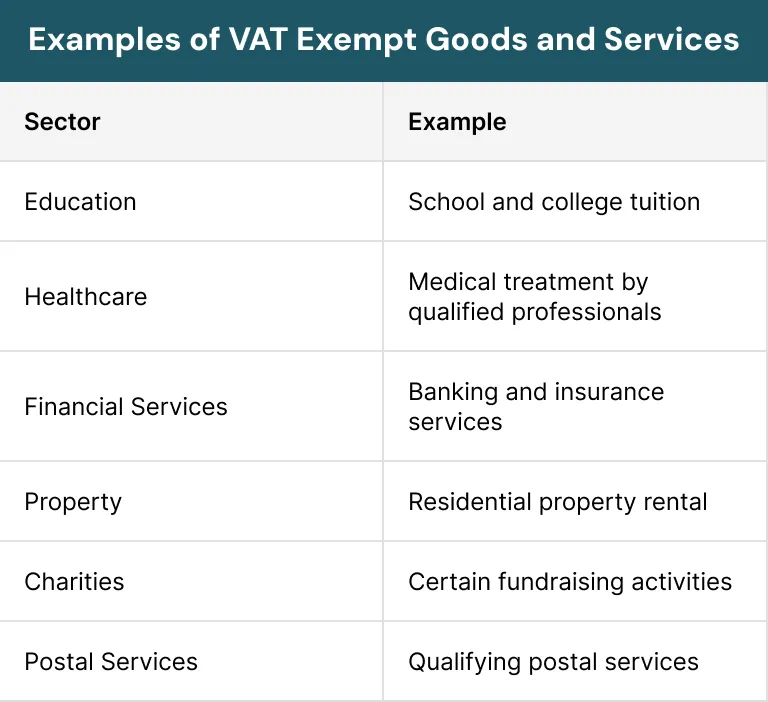
    Examples of VAT Exempt Goods and Services

    Many industries provide goods or services that are treated as VAT exempt under the rules of UK VAT.

    Knowing these examples can help you to find whether they are dealing with VAT exempt or zero rated supplies.

    • Education Services
    • Healthcare and Medical Services
    • Financial and Insurance Services
    • Charitable Activities
    • Rental of Residential Property
    • Postal Services

    Read more: What Disabilities Qualify for VAT Exemption? 

    1. Education Services

    This helps to make education more affordable for students and families. They also support learning across the UK.

    Examples may include school lessons, university courses and some vocational training programmes. The exact VAT treatment depends on the type of education being provided.

    2. Healthcare Services

    The VAT exempt for healthcare helps people to access the medical services at a lower cost. This is especially important for essential care.

    Many healthcare providers rely on it when they offer services to patients.

    3. Financial and Insurance Services

    Financial services often involve complex transactions. VAT exempt helps you to simplify the tax treatment of many of these activities.

    Examples include loans and insurance policies.

    4. Charitable Activities

    VAT rules for charities can vary depending on the type of activity or event. Some activities may be exempt, while others may be zero-rated or taxable.

    Keeping accurate records can help charities to apply the correct VAT. This also helps to avoid mistakes during the reporting of VAT.

    5. Rental of Residential Property

    This VAT exempt helps to keep housing costs more affordable for tenants. It means that VAT is not added to normal residential rent.

    Landlords should still keep clear records of rental income and related costs.

    6. Postal Services

    This supports the access to important postal services across the UK. It helps to keep standard mail services affordable for the public.

    Some specialist or express delivery services may not qualify for the VAT exempt.

    Examples of VAT Exempt Goods and Services

    What Is Zero-Rated VAT?

    Zero-rated VAT means a supply is taxable but charged at a VAT rate of 0%. Customers do not pay VAT, but the supply remains within the VAT system.

    This is the biggest difference between VAT exempt or zero rated supplies. Zero-rated supplies still allow VAT recovery in many cases.

    How Zero-Rated Supplies Work?

    Businesses that sell zero-rated goods issue invoices showing VAT at 0%. The sale remains the part of taxable turnover.

    This makes a major difference when comparing VAT exempt or zero rated supplies.

    Why Governments Apply Zero-Rated VAT?

    Zero-rating is often used for products that people need in daily life. This can help to reduce the cost of  household items.

    It also supports businesses because they can usually reclaim the VAT on related expenses. This makes the VAT system fairer for both consumers and suppliers.

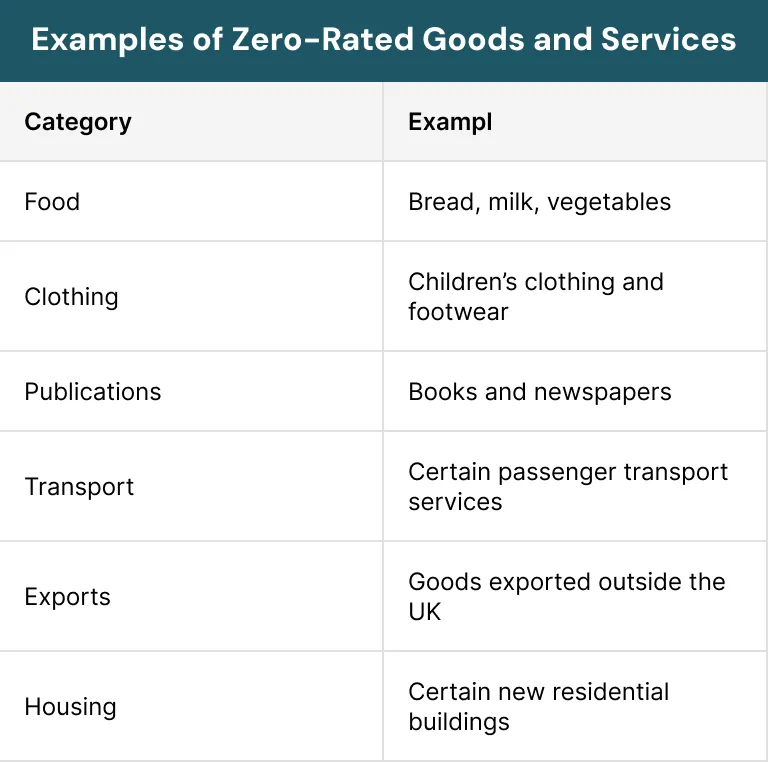
    Common Examples of Zero-Rated Goods and Services

    Many zero-rated products are linked to basic needs or public benefits. This helps to keep essential goods and services affordable.

    Although these items have a VAT rate of 0%. They are still part of the VAT system. Businesses must record them correctly on VAT returns.

    Here are some common examples of zero rated goods and services including:

    • Food and Essential Grocery Items
    • Children’s Clothing and Footwear
    • Books, Newspapers, and Publications
    • Public and Passenger Transport
    • Exports and International Supplies
    • Equipment for Disabled People
    • New Residential Buildings

    1. Food and Essential Grocery Items

    Zero-rating helps families to spend less on everyday food items. This is one reason why many basic foods are not subject to VAT.

    Items such as bread, milk, fruit and vegetables are commonly zero-rated. However, special rules may apply to some prepared foods.

    2. Children’s Clothing and Footwear

    This VAT relief helps parents to reduce the cost of buying clothes and shoes for children. It can make a difference for growing families.

    Businesses should make sure that products meet the size and design rules that apply to children’s clothing.

    3. Books, Newspapers and Publications

    Zero-rating supports education and also access to information. It helps in the process of reading and learning for people of all ages.

    Many printed publications qualify for this VAT. Businesses should still check the VAT status of different products.

    4. Public and Passenger Transport

    Transport helps people to travel for work and study. Zero-rating supports access to these important services.

    Different transport services may have different VAT rules. Operators should understand the requirements that apply to their business.

    5. Exports and International Supplies

    Zero-rating helps UK businesses to sell goods in overseas markets without adding VAT costs.

    Exporters must keep proof that goods have left the UK.

    6. Equipment for Disabled People

    This VAT relief helps disabled people to access products that support daily living. It can reduce the cost of important equipment.

    The rules may depend on the type of product and who it is supplied to.

    7. New Residential Buildings

    Zero-rating can help to reduce some costs linked to new buildings. This may encourage the construction of new homes.

    Property VAT rules can be complex. Developers should keep accurate records.

    Examples of Zero-Rated Goods and Services

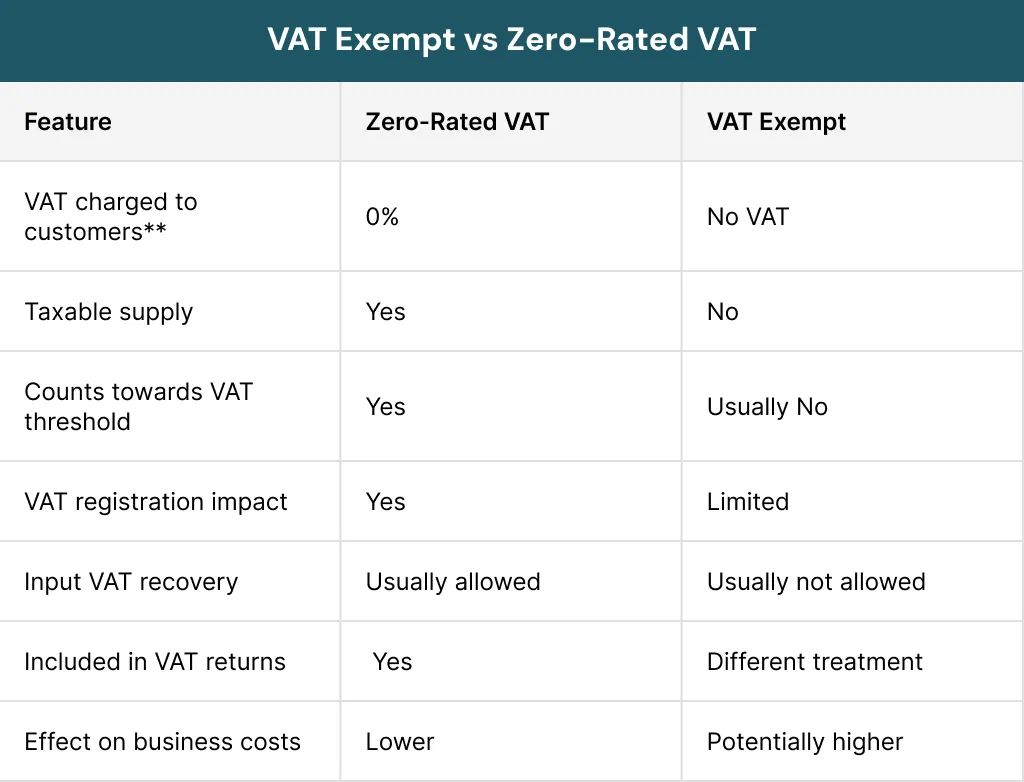
    VAT Exempt vs Zero-Rated VAT: Key Differences

    Understanding the difference between VAt exempt or zero rated supplies is important for every business.

    The biggest difference is VAT recovery. Businesses that sell zero-rated goods can often reclaim VAT on expenses. While businesses that make VAT exempt supplies generally cannot reclaim the VAT.

    1. Tax Treatment

    Zero-rated supplies remain within the VAT system even though the VAT rate is 0%. Businesses must still include these sales in their VAT records.

    By contrast, VAT exempt supplies are not treated as taxable supplies for VAT purposes. This changes how VAT is reported and recovered.

    2. VAT Charged to Customers

    Customers do not pay VAT on either zero-rated or VAt exempt supplies. This can make products and services more affordable.

    Although the customer sees no difference, businesses must understand whether a supply is VAT exempt or zero rated to apply the correct VAT treatment.

    3. Impact on Business Costs

    The ability to reclaim VAT often reduces costs for businesses that sell zero-rated goods. This can help to improve profit margins.

    With VAT exempt supplies, VAT paid on expenses often becomes an extra cost that the business must absorb.

    4. Administrative Requirements

    Both categories require accurate records and proper VAT treatment. You should keep clear records for HMRC.

    5. Effects on Cash Flow

    Businesses with zero-rated supplies may receive VAT refunds from HMRC. This supports healthy cash flow.

    Businesses that deal mainly with VAT exempt activities may not enjoy the same benefit because VAT recovery is limited.

    VAT Exempt vs Zero-Rated VAT

    Why Does the Difference Matters for Businesses?

    The distinction between VAT exempt or zero rated supplies can affect pricing and profits. A small error may lead to incorrect VAT returns and also lead to possible penalties.

    1. Impact on Profitability

    The ability to recover VAT can improve the overall profit. This is important for businesses with high operating costs.

    Businesses that make VAT exempt supplies may face higher expenses.

    2. Effect on Business Expenses

    Everyday costs such as rent, equipment and supplies may include VAT. Recovering this VAT can help to reduce the financial burden.

    3. Cash Flow Considerations

    Regular VAT refunds can support the cash flow and help business operations. For businesses that provide VAT exempt supplies, benefits of cash flow may be more limited.

    How to Determine Whether a Supply Is Exempt or Zero Rated?

    Determining the correct category of VAT is essential for compliance. A mistake can affect the VAT recovery and reporting process.

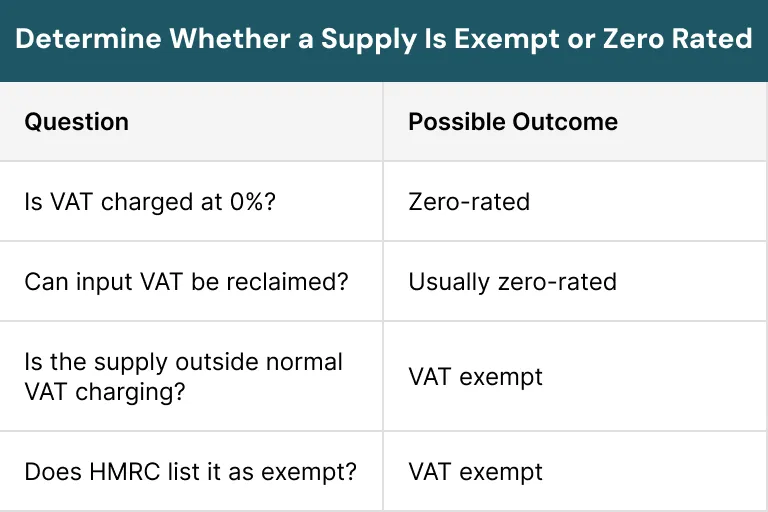
    You should carefully check whether a supply is VAT exempt or zero rated before applying VAT treatment.

    1. Reviewing HMRC Guidance

    HMRC publishes guidance covering many types of goods and services. These resources can help you to identify the correct VAT status.

    Pro tip:

    Reviewing official guidance can prevent costly VAT errors.

    2. Understanding Product and Service

    VAT treatment depends on the nature of the product or service being sold. Even similar products may have different VAT rules.

    3. Common Grey Areas and Exceptions

    Some supplies do not fit neatly into one category. Special rules may apply depending on the circumstances.

    Businesses should be cautious when dealing with unusual products or services.

    4. Seek Professional Advice

    Professional advice can help you to understand the complex VAT rules.

    Expert support is often valuable when determining whether supplies are VAT exempt or zero rated.

    Determine Whether a Supply Is Exempt or Zero Rated

    Case Study: VAT Exempt or Zero Rated Supplies

    A small UK retailer sold children’s clothing and educational books. The business owner believed that these products were VAT exempt and therefore did not claim VAT on related business expenses.

    After reviewing the business records, an accountant explained that these products were actually zero-rated, not VAT exempt. Because zero-rated supplies remain within the VAT system, the business was able to reclaim the VAT paid on certain costs.

    As a result, the retailer recovered the previously missed VAT, improved cash flow and gained a better understanding of VAT rules. This helped the business to stay compliant and avoid future mistakes.

    Conclusion

    Understanding the difference between VAT exempt or zero rated supplies is essential for businesses of all sizes.

    While customers often see no difference between them, the impact on VAT recovery, costs and compliance can be significant.

    A VAT exempt supply generally does not allow the VAT recovery. While a zero-rated supply usually does allow the VAT recovery. This distinction can affect the profitability, pricing and cash flow.

    At Sterling Cooper, we provide practical VAT support to help your business stay compliant, avoid costly mistakes and improve VAT efficiency.

    Not sure whether your goods or services are VAT exempt or zero rated?

    The VAT specialists at Sterling Cooper can help you understand the correct VAT treatment. Contact us today for expert VAT advice tailored to your business.
    +443300102526
    Book an Appointment

    FAQs


    What is the difference between VAT exempt and zero rated?


    Zero-rated supplies are taxed at 0% and usually allow businesses to reclaim VAT on expenses, while VAT-exempt supplies do not charge VAT and generally do not allow VAT recovery.


    No. Zero-rated supplies are taxable at 0%, while VAT exempt supplies are generally outside the VAT system.


    Zero-rated sales usually count towards the VAT registration threshold. A business may therefore need to register even when customers pay no VAT.


    Yes. Some businesses make both taxable and exempt supplies. In these cases, partial exemption rules may apply.


    Incorrect VAT treatment can result in underpaid VAT, overpaid VAT or HMRC penalties.

    Share This Article!

    Recent Posts

  • Why Monthly Management Reports Matter for Growing Businesses

    Why Monthly Management Reports Matter for Growing Businesses

    monthly management report​

    Posted by:

    Admin

    Date:

    June 22, 2026
    Category:

    blogs

    Error: Contact form not found.

    Why Monthly Management Reports Matter for Growing Businesses

    Your business is growing, but numbers are still not clear? It is a common problem faced by UK SMEs. Even when sales are up, there can be problems with cash flow and costs.

    Studies show around 22% of UK firms face cash flow issues in recent reports. This makes monthly management reports important for growing businesses. These reports give managers a clear view of cash flow and help control costs. They also support better decision-making by using up-to-date financial data.

    Key Takeaways

    • Monthly management reports help businesses track financial performance in real time.
    • They support faster and better business decisions throughout the year.
    • Regular management reporting improves cash flow control and forecasting.
    • Growing businesses can spot problems early before they become serious.
    • A monthly management report gives more visibility than annual accounts alone.
    • Management reporting for businesses helps directors plan staffing, pricing, and expansion.
    • Outsourced reporting can save time for SMEs with limited finance teams.
    • Clear monthly reports improve lender and investor confidence.

    What Are Monthly Management Reports?

    Management reports are just the basic monthly reports. These reports include the monetary figures and business information of the company. They enable the managers to know how well the business has performed in the past month. These reports also inform if there are any changes made to the budget.

    Did you know?

    Businesses using a monthly management report are more likely to spot cash flow problems early compared to yearly reporting. This helps avoid late financial surprises and improves control over business costs.

    Why Do Monthly Management Reports Matter for Growing Businesses

    These reports matter for growing businesses because these firms face fast changes. Costs can rise quickly. Staff costs can also increase. Vendor bills can also grow. Without regular reports, control becomes harder. These reports help track cash flow.

    The key reasons why monthly management reports matter are explained below:

    1. Stay Ahead of Cash Flow Issues

    To stay ahead of cash flow issues, you need to keep an eye on your growing expenses because they usually outpace revenue. Management accounts help you track these income and expenses in real time. You can find:

    • Cash flow gaps early
    • Forecast payment cycles
    • Supplier needs and plan for tax bills or big investments

    2. Make Data-Driven Decisions

    Monthly management accounts support better decision-making. These reports also provide the financial data needed to make those strategic decisions confidently. They:

    • Show accurate figures
    • Help you with budget comparisons
    • Let you track profit margins 

    Without monthly reports, though, you’re just guessing.

    Key Insight

    Strong management reporting for businesses removes guesswork. It turns financial data into clear actions like pricing changes, cost control, and smarter budgeting.

    1. Track Business Performance Over Time

    Management accounts help compare: 

    • Month-to-month results
    • Year-to-date performance
    • Budget vs actual outcomes 

    This lets you spot trends, seasonal changes, weak departments and key strengths to focus on.

    2. Prepare for Investment, Funding or Sale

    Firms require solid accounting data whenever they seek outside funding or sales. All these parties would like to be assured that their money is in safe hands. They would require recent and current financial figures, not old year-end data.

    This is what management monthly accounts provide. It provides information about the firm’s current performance.

    They help show:

    • Cash flow position
    • Profit levels
    • Spending trends

    3. Avoid Nasty Surprises at Year-End

    Many business owners only review their finances once a year. By that time, it is often too late to fix problems. Small issues like rising costs or cash gaps can grow over time. Using monthly management accounts can always help. You can

    • Track tax stuff and save up for it
    • Ensure VAT and PAYE are covered
    • Find overspending way earlier

    This is why growing businesses rely on monthly management reports.

    Monthly Management Report Template for UK SMEs

    What Makes a Good Monthly Management Report?

    A good management report links data with insights. It fills the gap between past performance and future planning. The report ensures everyone stays up to date and management remains in control and makes better financial decisions.

    These reports are: 

    • Timely – arriving a few days after the month ends
    • Clear – written in simple English
    • Easy to read – no confusing numbers 
    • Insightful – include short comments to explain results

    The reports should be customised for your business goals, showing KPIs that matter most. For instance, a retail company may track:

    • Gross profit margin
    • Stock turnover rate
    • Sales per square foot

    In contrast, a consultancy focuses on billable hours, utilisation rate, and revenue per client.

    Characteristics of a Good Monthly Management Report

    Who Prepares Management Accounts?

    Management accounts can be prepared by your in-house finance team or outsourced to accountants. Many small businesses don’t have the time or resources to make monthly reports, so we handle it for them. We provide accurate figures at an affordable cost. Our experts provide simple insights to help you understand the reports better. 

    “Without data, you’re just another person with an opinion,”

    by W. Edwards Deming 

    Do You Need Monthly Management Accounts?

    You should think about getting monthly or quarterly management accounts if:

    • You have more than five staff
    • You are growing fast or plan to
    • You need better cash flow control
    • You are preparing for funding or a sale

    If you want to base decisions on real data, this can help too. Monthly management reporting for businesses keeps things under control, increases profitability and stops you from missing financial issues.

    Monthly Management Report vs Annual Accounts

    Case Study

    Sage, a UK-based software company operating in over 20 countries, moved from one-time software sales to a subscription-based model. This change made regular financial tracking more important than ever.

    With stronger management reporting, Sage gained a clearer view of its monthly recurring revenue, customer contracts, cash flow, and income trends. This helped the company monitor performance more closely and make informed business decisions.

    As subscription revenue grew, regular reporting provided the visibility needed to track progress and plan ahead with greater confidence. The company’s income became more predictable, supporting long-term growth and stability.

    This example shows why monthly management reporting matters. By giving businesses a clear picture of their financial performance, it helps them identify trends early, make better decisions, and stay in control as they grow.

    Growth Tip

    If you only review a monthly management report once a month but don’t act on it, you lose its value. The real benefit comes from using it for weekly business decisions.

    Conclusion

    A monthly management report helps managers make better decisions. It also improves cash flow. Forecasting improves and financial risk is also reduced.

    Simply having annual accounts is no longer enough for small businesses in the UK today. Therefore, monthly management reports are becoming vital for growing businesses.

    At Sterling Cooper, we provide monthly management reporting for firms to ensure that managers have control over things. Contact us today to enjoy a clear view of your performance, cash flow and key business metrics.

    Struggling with unclear financial data each month?

    Many UK SMEs face the same challenge. Strong management reporting improves financial visibility, supports better decisions, and helps businesses stay in control of their finances. If you are facing these issues, get in touch today to see how the monthly management reporting can help grow your business.
    +443300102526
    Book an Appointment

    FAQs


    What Are Monthly Management Reports?


    Monthly management reports are structured documents that summarize a company’s financial and operational performance over a specific 30-day period. They provide decision-makers with a consistent, timely overview of business health, allowing them to track Key Performance Indicators (KPIs), assess budget adherence, and make informed strategic adjustments.


    Monthly management reports are vital for growing businesses because they provide a timely, data-driven snapshot of financial health. Rather than waiting for annual tax returns, these regular updates help owners monitor cash flow, track key performance indicators (KPIs), and adjust strategies before minor issues escalate.


    A monthly management report is an internal tool that summarizes a company’s financial and operational performance over the past 30 days. It typically includes an executive summary, core financial statements (P&L, cash flow, balance sheet), key performance indicators (KPIs), budget tracking, and actionable recommendations for the upcoming month.


    Management reports should be reviewed on a tiered schedule depending on the data type: daily/weekly for operational metrics (like sales or cash flow), monthly for comprehensive financial and strategic reviews, and annually for high-level governance. This cadence ensures timely course corrections without overwhelming leadership.


    Monthly management reports are generally better for day-to-day business operations and proactive decision-making than annual accounts. While annual accounts are essential for tax compliance and legal filings, they arrive too late to guide business strategy. Monthly reports provide timely financial visibility and control.

    Share This Article!

    Recent Posts

  • Is DIY Accounting Still Worth It in 2026?

    Is DIY Accounting Still Worth It in 2026?

    diy accounting

    Posted by:

    Admin

    Date:

    June 18, 2026
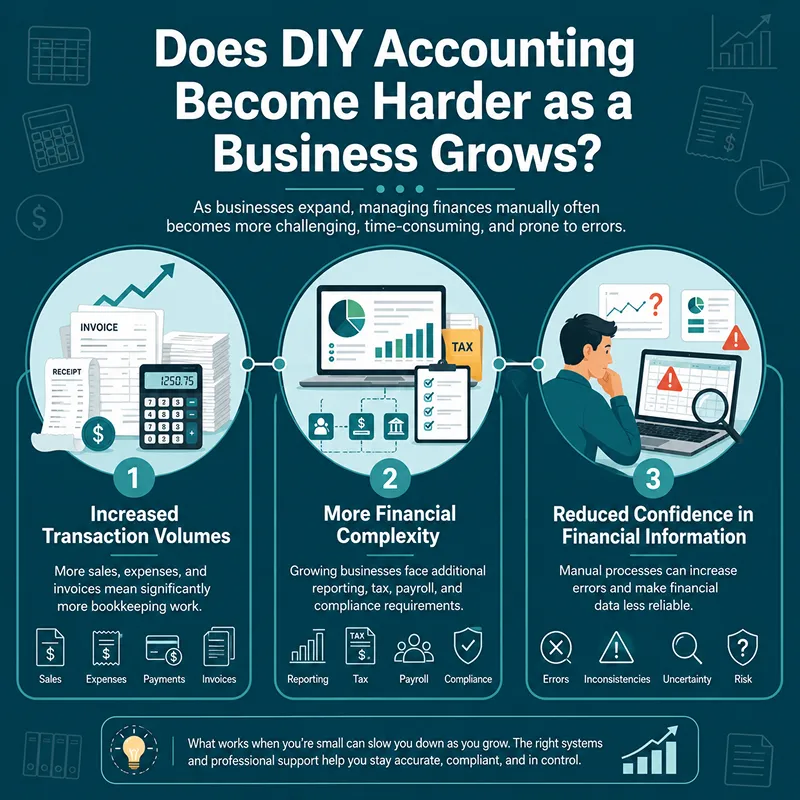
    Category:

    blogs

    Error: Contact form not found.

    Is DIY Accounting Still Worth It in 2026?

    Doing your own accounts may feel like a good way to save money but is it costing your business more?

    DIY accounting is when you manage your own financial records instead of employing a professional. A lot of sole traders, freelancers, landowners and small business owners in the UK do it.

    With the latest DIY accounting software, it is easier than ever to write down money coming in and track expenses. It is also beneficial to send invoices and prepare for tax.

    For example, some business owners use this strategy to save money and manage finances more effectively. Cloud tools can link to your bank, save receipts and make reports seamlessly. This approach leads to simpler daily bookkeeping.

    You have to understand that accounting in 2026 is not as simple as it used to be. From 6 April 2026, sole traders and landlords with incomes above £50,000 must keep online records. They must also utilise technology that aligns with HMRC’s Making Tax Digital (MTD) regulations. This means you have to keep correct records the whole year and report more frequently.
    In addition, growing companies have more transactions, VAT laws, workers to pay and other duties. What worked well at the beginning may become tougher as the company grows.

    However, some business owners still handle their money well and like the hold that DIY accounting provides them.

    So whether DIY accounting is still worth it in 2026 depends on how large your company is. It also depends on how complex your finances are and how much time you have.

    In this blog, you’ll learn if DIY accounting is still useful in 2026 and how MTD affects basics. You will also explore the hidden expenses and risks and when professional help might be needed.

    Key Takeaways

    • DIY accounting can work well for sole traders and small firms with simple finances, but it becomes harder as tax rules, reporting needs, and business activity grow
    • DIY accounts need accurate records, regular checks, and a clear understanding of HMRC rules to avoid errors, missed tax reliefs, and costly penalties
    • DIY accounting software can automate tasks such as invoicing, bank feeds, and tax updates, but it cannot replace expert judgement, tax planning, or business advice
    • DIY accounting UK requirements have changed with Making Tax Digital, meaning many business owners now need digital records, approved software, and more frequent reporting
    • Understanding how to use diy accounting starts with separating business finances, choosing the right software, tracking income and costs correctly, and knowing when professional support adds value

    What Is DIY Accounting?

    DIY accounting is the practice of managing your own business money records without regular assistance from an accountant.

    This can consist of monitoring income, saving receipts, tracking expenses, sending invoices and checking bank payments. This also involves preparing tax returns and keeping proper records for HMRC.

    Some people use spreadsheets and some use digital tools. However, many now use DIY accounting software to make the work faster and easier.

    This can be adequate for a very small business. Your paperwork may be simple if you only have a few sales and costs each month. This way, you may read your numbers clearly and may only need a basic system and a steady pattern.

    However, there is one essential point. Even if software assists you, you are still liable for your records. The reason is that if something is incorrect, the mistake belongs to the business owner, not the app.

    That is why DIY accounts can feel simple at the beginning but tougher later.

    Hire an accountant when you’re spending more time on bookkeeping than growing your business, as their expertise typically saves more money through tax deductions and compliance than their fees cost.

    Jotika Teli, Certified Public Accountant

    Why Has DIY Accounting Become So Popular?

    DIY accounting has developed because it looks simple, inexpensive, and flexible. A long time ago, bookkeeping often seemed tough because business owners required paper files, manual records or costly desktop systems.

    However, the responsibilities seem less complex these days due to cloud technologies. Owners choose this system for three main reasons:
    Related: 5 ways cloud accounting can save your time and money

    1. Lower Costs

    Price is the most significant reason. Many small business owners do not want to pay monthly accounting fees.

    A software subscription can look much less expensive than recruiting an accountant. This can make sense for a new company and even every pound is important when sales are still low.

    However, the cheapest option is not always the highest value. Time, pressure, missed tax savings and errors can also cost money.

    2. Greater Financial Control

    Some owners choose to be close to their finances. They want to see cash flow, sales, expenses, unpaid invoices and tax forecasts themselves.

    This can be a good aspect because when you understand your accounts, you can make better decisions. Besides this, you can spot late payments, cut the waste and plan for the future.

    This is one reason many entrepreneurs like handling DIY accounts in the early days because it helps them feel in control.

    3. Easier Access to Technology

    Advanced tools have made bookkeeping much less terrifying. They can retrieve bank data, match payments, scan receipts, send invoices and generate reports.

    This has assisted in making people who are not finance specialists feel more confident. However, software only works well when the information is accurate. If an expense is put in the incorrect location, the report turns out to be wrong.

    Why Has DIY Accounting Become So Popular

    Is DIY Accounting Easier Than Ever in 2026?

    In many ways, DIY accounts are less difficult than ever in 2026. DIY bookkeeping is easier now because software does more of the necessary work.

    With the help of this, bank accounts can bring in transactions and receipt tools can save evidence of spending. You can also create your reports in seconds. Some platforms use AI to suggest groups and find uncommon items. This can save time and can also help owners stay organised.

    1. How Latest Accounting Software Helps

    Good applications can assist with daily tasks. It can record income, track costs, submit invoices, store receipts, monitor cash flow and generate profit reports.

    DIY accounting software can also be helpful with online records for MTD. It keeps information in a single location and makes regular reporting simpler. This approach can be very useful for simple firms.

    2. Where Software Falls Short

    Software is not the same thing as expert guidance. It is developed to process data, automate tasks and prepare reports but it cannot understand the context behind business decisions.

    It can keep track of a cost but it may not know if the cost is refundable. It can display a profit but it may not explain why profit has gone down. The same way, it can estimate tax but it may not recommend the best tax plan.

    DIY accounting software performs routine tasks, while an accountant offers insight and expert judgement that software alone cannot. This difference becomes more important as a business grows.

    Does DIY Accounting Become Harder as a Business Grows?

    DIY accounting frequently works well at the initial stage, then becomes harder over time. A new company may have limited clients, a few costs and no staff. The proprietor may be able to revise records once a week.

    As a business grows, the volume and complexity of tasks increase, creating new duties across sales, billing, suppliers and compliance. There may be more sales, more invoices, more suppliers, more payments and more regulations. A system that worked in the starting years may not work after two or three years.

    The issues below explain why many business owners find DIY accounting harder as their business expands:

    1. Increased Transaction Volumes

    If sales are high, there will be more records and more records mean more chances for errors. You may need to monitor card charges, refunds, unpaid invoices, supplier bills, stock fees and different payment methods. This can transform a quick weekly task into a long managerial job.

    2. More Financial Complexity

    When your business grows, it can also bring VAT, salary, pensions, loans, finance agreements or earnings from different places. Each newly created part takes on more duties. At this stage, DIY bookkeeping often becomes complex and lengthy.

    3. Reduced Confidence in Financial Information

    Reports may become more difficult to trust as the company gets more complex. You will encounter many situations where you may be unsure if VAT is right. Also, you may not know if costs are in the proper place. You may see profit in books or on screens but still not know what it means.

    When you do not trust your financial records, it gets harder to make right decisions.

    Does DIY Accounting Become Harder as a Business Grows

    Can DIY Accounting Software Replace an Accountant?

    DIY accounting software does not fully replace an accountant. Software can substitute for some office work. It can help with invoices, documents, receipt storage, tax estimates and online records. However, it cannot replace expert experience.

    What Software Can Do

    DIY accounting software is helpful for everyday jobs. It can speed up bookkeeping, decrease paper records, display basic reports, support MTD and notify you about unpaid invoices. For a small business with simple budgets, this may be adequate for a period of time.

    Keep in Mind!

    Accounting software can automate data entry, invoicing, and tax submissions, but it cannot provide tax planning advice, explain complex rules, or help you make strategic business decisions.

    What Accountants Provide

    Accountants do much more than just record finances; they help clarify what your figures actually mean. They can also help you plan tax and spot risks. Besides this, they can support VAT, payroll, cash flow, company structure and HMRC questions.

    They also know common errors which can help you avoid issues before they become expensive.

    What Are the Hidden Costs of DIY Accounting?

    The apparent cost of DIY accounting is usually the software expense. However, that is not the full price because there are also hidden costs too. These include:

    1. Time Costs

    Bookkeeping is a time-taking system. In the same way, checking records, chasing receipts, fixing errors and preparing reports also take time.

    You are not putting those hours into sales, customers, service or growth if you spend hours a week on accounts. For some proprietors, lost time expenses are more than the accountant fee they wanted to prevent.

    2. Missed Tax Deductions

    Many business owners overlook ordinary costs for which they are eligible to a refund. These may include fuel, home office costs, transport, insurance, training, professional fees and other business costs. Failure to submit valid claims can result in paying more tax than needed.

    3. Cost of Correcting Mistakes

    You may have to pay more costs for mistakes. A faulty VAT return, missing receipts or incorrect records may need to be corrected. In some scenarios, an accountant may need to clean up old books. That can end up costing more than getting help earlier in the process.

    4. Stress and Mental Pressure

    It can be stressful to manage money. Tax dates, regulations, receipts and HMRC documents can create tension. This pressure can impact your focus and your decisions.

    Quick Insight!

    Many business owners start with DIY accounting to save money, but the highest cost is often time. Hours spent on bookkeeping, tax returns, and compliance could be spent winning new clients or growing the business.

    What Compliance Risks Come with DIY Accounting?

    Being faithful to the regulations is known as compliance. In accounting, this refers to tax, VAT, payroll, pensions and record-keeping. When you handle everything alone, it is sure that you can miss something.

    Some of the most common compliance risks are given below:

    1. MTD Compliance

    MTD requires digital records, compatible software, regular updates and clear time frames. If your documents are weak, your revisions may be wrong.

    2. VAT Compliance Challenges

    VAT can be challenging because there are different rates, registration limits, zero-rated items, excluded supplies and special rules. If you get a VAT return wrong, It can lead to higher tax, fines and time spent fixing mistakes.

    3. Payroll and Employment Obligations

    If you hire staff, you may need to run PAYE, report wages to HMRC, handle pensions and keep employee records. Accounting errors can have an impact on your staff as well as your company.

    When Does DIY Accounting Usually Stop Working?

    DIY bookkeeping often quits working when it takes too much time, causes too much doubt or adds too much risk. It’s simple to detect common warning signs.

    In most situations, you fall behind on bookkeeping, do not grasp your reports and have concerns about VAT or payroll. Besides this, you are unsure what to claim, spend free time fixing records and feel stressed before tax deadlines.

    These indications mean your system may no longer suit your business. For many owners, DIY accounts become more difficult to handle at this point.

    Here are some common indicators that DIY accounting may no longer be enough:

    1. Growing Transaction Volumes

    More sales and costs lead to more admin tasks. If bookkeeping keeps getting postponed, mistakes become more frequent.

    2. Lack of Financial Visibility

    A report is only helpful if you fully comprehend it. You might need more guidance if your accounting doesn’t help you make decisions.

    3. Increased Compliance Pressure

    A single person cannot handle MTD, VAT, payroll and tax deadlines because it becomes too difficult. As your business expands, there are more rules to follow and more dates to keep in mind.

    Missing a due date or making a mistake can create extra work and may even lead to fines. It can get exhausting and stressful to keep up with everything.

    4. More Time Spent on Administration

    Accounting may no longer be saving money if it takes time away from growth. Many company owners start by putting in a few hours of work each month on their accounts.

    However, as the business expands, those hours can very quickly turn into days. The more time you devote to documents, the less time you have to serve clients, win new deals and grow your company.

    5. HMRC Investigations and Reviews

    HMRC can ask you to show your paperwork. In that case, you need detailed reports, receipts and proof of transactions. Besides this, good records make this easier and poor records make it stressful.

    Why Do Companies Prefer Support Over DIY Accounting?

    Today, many UK firms choose a hybrid system. They utilise accounting software while also relying on a bookkeeper or accountant for help. This gives them more precise records, concise advice and extra time to focus on their business.

    1. Better Accuracy

    Accountants and bookkeepers are familiar with how to check finances thoroughly. They can catch errors and make reports more understandable. 

    2. Greater Compliance Confidence

    Experts assist companies in keeping up with regulations. They make sure forms, deadlines and questions for HMRC are dealt with properly. 

    3. Access to Professional Advice

    A qualified accountant can help with tax planning, cash flow, costs, business structure and growth decisions. This knowledge can be worth more than routine bookkeeping.

    4. More Time to Focus on Growth

    Owners get more time due to outsourced services. Instead of organising receipts at night, they can focus on clients, sales and better service.

    How Is IT Altering DIY Accounting?

    Technology will continue to have an impact on the accounting field. AI and automation can generate dashboards, inspect receipts, align payments and detect unusual items. These softwares are helpful for entrepreneurs in maintaining a firm and simplifying everyday tasks.

    AI in Accounting

    AI can be beneficial for routine activities. It can speed up written materials, spot trends and classify data. For small enterprises, this strategy makes DIY bookkeeping more accurate and helpful.

    Human Expertise Still Counts

    AI is not familiar with your entire business structure. It cannot always figure out tricky tax issues and does not grasp your aims in the same way that a real person can. In most cases, the best approach is for people and software to work together.

    How Has MTD Changed DIY Accounting?

    MTD is one of the most significant reforms for UK company owners and landlords. Many independent people and landlords will need to keep documents digital. They must use approved software, send updates and submit a final report each year.

    This transforms a tax from a yearly task into a periodic expense. It also means DIY accounting needs a more robust process.

    New MTD Requirements

    The main standards of MTD are clear. According to these conditions, keep online records, use software that works with HMRC systems and send updates throughout the year. You must also complete a final statement after the tax year is over.

    More people will enroll in MTD later as the earnings limits fall. This implies that DIY accounts must be kept up to date all of the time. Putting off everything until the end of the year is no longer a wise strategy for numerous taxpayers.

    MTD Made Good Bookkeeping More Vital

    Quarterly revisions mean your records need regular attention. If earnings are ignored, costs are incorrectly listed or receipts are lost, the issue can grow over time.

    MTD does not imply that software will do everything for you. Rather, it means your records must be on the web, timely and precise.

    Related: MTD for income tax

    Case Study: How an Accountant Supported a Small Business

    A small business owner in the UK had aid from an accountant with annual accounts and tax documents.

    Everything turned out to be satisfactory at first. However, different due dates meant the owner had to deal with accounting jobs many times during the year. This used so much time and caused pressure.

    The owner was utilising too much time on documents instead of managing the company. To assist, On The Spot Tax developed a less complex strategy. They had meetings with the owner, inspected the business regularly and carried out important accounting work at the suitable times.

    Instead of interacting with accounts multiple times, the owner could finish everything in a more structured way.

    As a result, there were fewer emails, a decrease in delays and reduced stress. The owner was also aware of future tax payments earlier, making it easier to organise business financial affairs.

    The company even lowered its accounting expenses from £1,800 to £1,300 per year while still getting top-notch guidance.

    This case points out that doing your own accounting may be beneficial when a business is small. However, as tasks become complex, expert help can save time, minimise stress and let business owners focus on business growth.

    Final Thoughts

    DIY accounting is still a practical option for self-sufficient small-scale business owners. With today’s software, it can help save money and make monitoring income and expenses easier.

    However, the financial aspect becomes more stressful as a business develops. It takes more time and effort to carry out tasks like filing taxes, making payments to employees and maintaining records. Even small accounting errors can lead to serious financial issues and sudden losses.

    Sterling Cooper helps firms stay organised, keep precise records and make better economic decisions because it recognises these challenges. As a result, business owners have more time to work on expanding their company.

    Contact us today to discover how we can help you stay on top of your financial affairs and focus on what counts most.

    Spending too much time on DIY accounting and worried about compliance?

    Our team helps businesses stay compliant, reduce admin, and gain clear financial insight.
    We have helped hundreds of businesses improve their accounting processes and financial management. Reach us today.
    +443300102526
    Book an Appointment

    FAQs


    Is DIY accounting in the UK suitable for small businesses?


    DIY accounting in the UK can work well for sole traders and small businesses with simple finances. However, as transactions, tax obligations, and compliance requirements increase, professional support may help reduce risks and save time.


    To learn how to use DIY accounting, start by keeping accurate digital records, separating business and personal finances, and using suitable accounting software. Regular reviews and understanding HMRC requirements are also important for staying compliant.


    The biggest accounting trends in 2026 include greater use of AI, automation, cloud-based software, and Making Tax Digital compliance. Businesses are increasingly using technology to automate bookkeeping tasks while relying on accountants for strategic advice, tax planning, and financial decision-making.


    Some of the most widely used accounting software platforms in the UK include Xero, QuickBooks, Sage, and FreeAgent. Each offers features such as invoicing, expense tracking, bank feeds, and tax reporting, making them popular choices for sole traders, landlords, and small businesses.


    Excel spreadsheets can be used to record income, expenses, invoices, and cash flow in one place. Small businesses should update records regularly, use separate categories for transactions, and reconcile spreadsheet data with bank statements to help maintain accurate financial records.

    Share This Article!

    Recent Posts

  • How Often Should a Small Business Update Its Bookkeeping in the UK?

    How Often Should a Small Business Update Its Bookkeeping in the UK?

    small business bookkeeping

    Posted by:

    Admin

    Date:

    June 17, 2026

    Category:

    blogs

    Error: Contact form not found.

    How Often Should a Small Business Update Its Bookkeeping in the UK?

    Every business keeps its records but how often should it be updated? Just like bookkeeping for large scale businesses, small business bookkeeping is about documenting all cash flows that enter and leave your business. It allows you to know your actual standing in terms of finances anytime you want. Most of the small businesses in the UK have challenges in maintaining accurate records and up-to-date documentation. This results in cash flow problems and poor financial management.

    Bookkeeping for small businesses is important to avoid cash flow issues and to keep the records aligned and updated. Timely updates will allow for reducing errors and making good decisions. Currently, there are 5.5 million businesses within the UK private sector in 2024. Among these, 5.45 million firms fall into the category of small businesses with no more than 49 employees. Small business bookkeeping becomes a major issue for UK firms.

    Key Takeaways

    • Small business bookkeeping should be updated regularly to stay accurate and useful.
    • Most UK businesses benefit from daily, weekly, or monthly updates.
    • Frequent updates help reduce errors and improve cash flow control.
    • Using small business bookkeeping software can save time and improve accuracy.
    • Good bookkeeping supports better decisions and long-term business stability.

    Why Is Small Business Bookkeeping Important for UK Businesses?

    Bookkeeping in the UK is an accounting technique used to document all money entering and leaving the company. Sales, expenses, invoices and salaries are some of the items that need to be recorded. It makes the accounting of the company easy and accurate. Bookkeeping simplifies the management of money.

    Small business bookkeeping in the UK is important as it enables you to record all the finances that go in and out of your company. This will allow you to have an overview of the financial state of your business. It will also enable you to make informed decisions to outgrow the business.

    What Happens If Bookkeeping Is Not Updated Regularly?

    If bookkeeping is not updated regularly, then these cash flow issues will build up quite rapidly. It may cause you to miss payments or ignore invoices. Incorrect record-keeping could lead to HMRC penalties. It also makes it more difficult to see the real performance of your business. Updating regularly not only ensures that there will be no problems. It will also enable your business to expand with confidence.

    • Bookkeeping Support Business Growth

    This allows you to plan with concrete figures. The profits and losses can be easily seen. It will also prepare you for the taxes that need to be filed at certain times. This way, no hassle will happen for you during busy times.

    How Often Should Small Business Bookkeeping Be Updated?

    Small business bookkeeping must be done according to a fixed timetable. This will help you avoid errors and lost accounts. Your cash flows will also remain clear at all times. The majority of firms in the UK conduct their updates either daily, weekly, or monthly. A right schedule would depend on the nature of your business and the level of data involved.

    1. Daily Bookkeeping Updates

    The use of daily updates works best for businesses with lots of transactions. These daily updates will enable you to monitor your cash flow. You will be able to document your expenses and sales on a regular basis. This will also minimise the risk of lost receipts.

    2. Weekly Bookkeeping Updates

    The weekly updates suit most small businesses in the UK. It ensures that their records are neat and up-to-date. Bank reconciliations are easy with weekly updates. It helps avoid a backlog of work.

    3. Monthly Bookkeeping Updates

    Monthly Bookkeeping is best for full performance analysis. This will enable you to analyse the profit and loss in a very clear way. It allows you to analyse your VAT and other reports. It enables you to understand cash flow trends.

    “What gets measured gets managed,”

    by Peter Drucker 

    What Is the Best Bookkeeping Schedule for Small Business Bookkeeping in the UK?

    A good schedule for small business bookkeeping should have tasks that occur on a daily, weekly and monthly basis. This makes accounting for your small business easier and more consistent. It also lowers the pressure you feel when tax season comes around. Breaking the activities down into daily, weekly and monthly actions will simplify bookkeeping.

    1. Daily Bookkeeping Task

    Make sure that all sales are recorded on the same day. Make sure you keep track of all your expenditures. You will make sure that there are no errors in your record-keeping.

    2. Weekly Bookkeeping Task

    Match bank statements every week. Look out for any unpaid accounts receivable. This will help keep your books reconciled. You will notice any mistakes early on.

    3. Monthly Bookkeeping Task

    Analyse profit and loss accounts. Check your status in terms of cash flow. This gives you an idea about the financial state of your business. You will be able to make plans for the following month.

    Bookkeeping Frequency Overview for Small Businesses

    What Factors Affect How Often You Update Small Business Bookkeeping?

    The small business bookkeeping will be different from one business to another. This would depend on the size of the business and its growth. This would also be decided based on the number of daily transactions carried out by the business firm. Knowledge about these factors will help you choose the right bookkeeping schedule that is easier for you.

    1. Business Size and Bookkeeping Frequency

    Business size can affect how often record keeps updating. If a small company is involved, there may be updates done once a week or a month. But as the SME scales up, it will require frequent updates. Larger operations mean larger transactions to account for.

    2. Transaction Volume and Bookkeeping Needs

    The number of transactions matters a lot. Retail shops often need daily updates. Service businesses can update less often. More transactions mean more chances of mistakes. So, busy businesses need faster bookkeeping control.

    3. Industry Type and Bookkeeping Frequency

    The type of business also changes how often you do bookkeeping. Online shops need daily updates. Consultancy work can be updated less often. Trade businesses depend on cash flow timing. So, each business needs its own simple routine.

    Read More: Essential Bookkeeping Tips Every Small Business Should Follow

    What Are the Common Bookkeeping Mistakes Small Businesses Make?

    Many small businesses make bookkeeping mistakes when the records are not up-to-date. This results in inaccuracies and a lack of information. Small business bookkeeping can also impact cash flows and taxes. Errors are caused mostly by delays or bad procedures. Knowing about these common mistakes that small businesses make will help you ensure that your documents remain accurate and free from any major problems in the future. If these common mistakes can be avoided, small business bookkeeping will become much simpler and more reliable.

    1. Delayed Bookkeeping Updates

    Many businesses delay as they do not have enough time. Some even employ manual systems, which are more time-consuming. Owners who are busy tend to defer it until later. This results in delays in their record-keeping process.

    2. Lack of Regular Reconciliation

    Errors can go unnoticed for many years. The bank records do not match the books. There could be difficulties with cash flow. It could also cause problems with HMRC.

    3. Mixing Personal and Business Finances

    Using the same account for personal and business finances can confuse the record-keeping. You will not be able to capture the actual cost of running your business. It also means that the tax process becomes more difficult. Checking by HMRC becomes riskier.

    Common Bookkeeping Mistakes and Impact

    How Can Small Business Bookkeeping Software Improve Update Frequency?

    With small business bookkeeping software, keeping records becomes easier, faster and more accurate. They help cut down on manual labor and save time daily. Moreover, all your records can be stored in one system easily. Thus, you will have no trouble keeping your books up to date.

    In order to have a better understanding of this concept, let us analyse the issue on the basis of update frequencies that can be achieved through bookkeeping software.

    1. Faster Daily Bookkeeping Updates Through Software

    The bookkeeping software enables companies to enter transactions as soon as they occur. Transactions for sales, purchases and receipts can all be added on the spot. This ensures that recording entries on a daily basis is easy and convenient.

    2. Automated Weekly Updates With Reduced Manual Work

    The process of automation will reduce the time spent on repetitive bookkeeping processes. Transaction information is updated through bank feeds. Expenses and invoices will be synced automatically into the system. As a result, weekly records are accurate and up to date.

    3. Real-Time Continuous Updates Using Cloud Access

    The cloud tools provide an option to access the information anytime and anywhere. Business owners can update their accounts on the go. This makes sure that there is no delay in accounting. As a result, there is an ongoing and instant monitoring of accounts.

    Manual vs Digital Bookkeeping

    Case Study

    One of the mistakes that UK small firms make is updating their accounts at the end of every quarter to match HMRC VAT requirements. This implies that they use outdated information that may be several weeks or months old. 

    In an actual scenario, a London hospitality firm used quarterly bookkeeping. As such, they were unable to keep track of the rise in their cost of suppliers and the stock loss experienced. The effect was slow, but they were unaware of its impact on their cash flow.

    Once they started using weekly bookkeeping, everything changed for the better. It became easier to monitor weekly expenses and payments from suppliers. Also, it helped them detect any stock loss and manage the purchasing procedure. In addition, they were able to follow up on outstanding debts.

    What Are the Best Practices for Small Business Bookkeeping in the UK?

    Simple and consistent practices are essential for effective small business bookkeeping services. It is necessary to maintain it according to a certain schedule. In this way, the books will stay clean and well-organised, and the process of tax payments will cause less anxiety. To apply these practices in real life, it helps to break bookkeeping into key routine tasks.

    1. Weekly Bank Reconciliation for Accurate Records

    Accountants need to verify bank accounts each week. This ensures that the records coincide with actual business dealings. It also makes sure there are no discrepancies at an earlier stage. This makes bookkeeping more efficient.

    2. Easy Receipt and Expense Tracking Using Digital Tools

    Use software programs to keep track of the receipts. Applications allow you to do it fast and easily. The bills can be uploaded anywhere. It will ensure that the receipts are not missed.

    3. Monthly Financial Report Reviews for Better Control

    Financial reports must be checked every month. In some cases, companies check financial statements quarterly. This is useful for knowing your profit and money flow. Also, this will help plan your future steps properly.

    Read More: How Outsourced Bookkeeping Services Can Save You Time and Money

    How Often Should Small Businesses Update Bookkeeping Before HMRC Deadlines?

    Always update your bookkeeping before the tax deadline. It is best not to wait until the very end when panic sets in. This will make sure you have all the paperwork done in advance. To fully understand the impact of this, it is a must to know what role regular bookkeeping plays in HMRC compliance.

    1. UK Tax Deadlines That Need Updated Bookkeeping

    Quarterly VAT returns should be filed every quarter. The deadline for self-assessment is always set for January. PAYE has to be paid on time too. Failure to do this leads to penalty charges. Therefore, accurate record-keeping becomes very important.

    2. Impact of Up-to-Date Records on HMRC Compliance

    Updating the bookkeeping ensures that the data is always up to date. It prevents errors from occurring when filing taxes. In addition, deadlines are easily met through updating. This decreases the chances of HMRC penalties and fines.

    Conclusion

    Small business bookkeeping is much more than just a process. This is important for ensuring that your company remains stable in the UK. You can do this process at any frequency that you like, but the higher the frequency, the better it will be for your company. It can be done daily, weekly, or even monthly.

    At Sterling Cooper, we help you avoid errors and improve cash flow management. Our bookkeeping services for small businesses help you organise everything and save a few minutes each day.

    Struggling to keep your bookkeeping up to date?

    It can feel messy when records pile up.
    We help small businesses in the UK stay on top of their books with clear, simple support. No stress, no confusion, just steady and accurate records. Get in touch today and let’s make your bookkeeping easier to manage.
    +443300102526
    Book an Appointment

    FAQs


    What is small business bookkeeping software?


    It is a digital tool used to record and manage business finances. It helps track income, expenses, and invoices in one place. This makes bookkeeping faster and more accurate.


    Popular choices include Xero, Sage and QuickBooks. They help manage accounts, cash flow, and reports easily. The best option depends on your business size and needs.


    It brings all financial records into one system. It automates tasks like invoicing and expense tracking. This saves time and reduces manual errors.


    Yes, most tools are designed for non-accountants. They offer simple dashboards and guided features. This makes daily bookkeeping much easier.


    It helps keep finances organised and up to date. It improves accuracy and supports better decisions. It also makes tax filing and reporting simpler.

    Share This Article!

    Recent Posts

  • Cloud Accounting vs Traditional Accounting: Which Is Better for UK Businesses?

    Cloud Accounting vs Traditional Accounting: Which Is Better for UK Businesses?

    cloud accounting vs traditional accounting​

    Posted by:

    Admin

    Date:

    June 16, 2026

    Category:

    blogs

    Error: Contact form not found.

    Cloud Accounting vs Traditional Accounting: Which Is Better for UK Businesses?

    Are you still dealing with your business financial affairs the traditional way? Knowing the differences between cloud accounting vs traditional accounting can assist UK firms in choosing the most reliable solution.

    You might know what traditional accounting is but may not have any idea about cloud based accounting. 

    It is vital to pick the right financial system for growth, compliance, safety and efficiency.

    Firms handle their cash flow data in two ways:

    • Cloud accounting
    • Traditional accounting

    Studying cloud accounting vs traditional accounting and selecting one can impact how firms track their financial performance. 

    Classical setup often uses paper files, Excel, desktop software and manual steps.

    On the other hand, in cloud accounting, you store your financial records on the internet. In this system, you allow firms to access data anywhere online, in real time.

    For many years, UK firms mostly relied on traditional accounting software. This is because, in this system, you are able to access full control over your cash details offline.

    Modern cloud accounting software is becoming prevalent because it is flexible and easy to use.

    So, instead of sharing files, owners and auditors can work together on the same financial records at the same time. In the UK, most firms are now shifting towards digital accounting.

    Studying cloud accounting vs traditional accounting shows which method is faster, easier and more reliable for running business finances.

    Research shows that nearly 80% of UK accountants adopted cloud accounting in 2024. On the other hand, the use of traditional systems was only 13%.

    However, both these modes still have pros and cons. These benefits and cons are based on the working style, security norms, costs and business needs. Firms also pick finance systems based on cost, capacity and support for remote work. In addition, they also consider Making Tax Digital (MTD).

    In this blog, you will learn about cloud accounting vs traditional accounting. Besides this, you will know their pros and cons. You will also explore which system is currently best for firms in the UK.

    Key Takeaways

    • Cloud accounting vs traditional accounting shows that cloud systems give faster access, while traditional systems give more control
    • Traditional accounting vs cash basis helps businesses choose the right method for tax and reporting needs
    • Cloud-based accounting lets users access financial data from anywhere using the internet
    • Cloud-based accounting software helps reduce manual work through automation and real-time updates
    • “What is traditional accounting?” refers to a system where data is stored on local computers and handled manually 
    • The benefits of cloud accounting include real-time data, easier teamwork, lower IT costs, and better scalability

    What Is Traditional Accounting?

    Traditional accounting is the way of using accounting tools on a PC or company server and saving financial data offline. In such cases, firms depend on basic finance methods, Excel or paper files.

    Old systems work only on the specific PC of the office where their software is installed, unlike cloud accounting. Thus, if you want to access the financial data by remote means, it is very difficult. For this purpose, you have to add an extra tech setup.

    Firms have long used traditional accounting software for taxes, reports, payroll and invoices. Even now, many reliable firms use this for their financial systems.

    The reason is that they can run it without internet access, are reliable and offer local control over data.

    Many UK firms argue about cloud accounting vs traditional accounting. However, they need to study each one in detail to know which is better for their company.

    Making Tax Digital, with my accountant’s support, means it’s a lot less stressful for me now.

    Gwyn Morgan, Founder, Tyr-Ex Ltd (Motor trade business, UK)

    How Traditional Accounting Works?

    A traditional accounting system follows a manual and local process. It is managed at the site by the business.

    In this setup, you enter financial details into Excel or PC software. The records are then stored on local computers or servers.

    In traditional accounting, the following steps are common:

    • Enter costs and income by hand
    • Store invoices and receipts in person or on local systems
    • Update software manually
    • Manage security and backups within the company
    • Access to financial data is limited
    • Use USB drives or email to share records

    Firms must choose between traditional accounting vs cash basis with care.

    With local software, firms manage the network, updates, data safety and upkeep themselves.

    This offers the traditional method an advantage in terms of control in the cloud accounting vs traditional accounting discussion.      

    What Are the Pros of Traditional Accounting?

    After the rise of cloud accounting, more and more firms are using it. Yet, some firms still find traditional accounting ideal for their systems. However, it is good to study traditional accounting vs cash basis in detail. It includes:

    1. Offline Availability

    You have offline access to traditional accounting, which is one of its biggest perks. Firms can work without the web, which keeps them running. This is very helpful for groups in zones with poor internet. Owners can check their files at any time with ease. They usually find it comfortable to use offline tools to work.

    2. Full Financial Details Control

    Traditional accounting gives you full control over your financial data. Data is kept on local systems. Firms manage backups, security and storage on their own.

    Many firms pick this method because it is easy for them to handle financial data. They do not like to store data on third party servers.

    3. Familiar Systems and Methods

    Many famous firms still use traditional accounting systems because they know how to use them. This method helps avoid changes in the office and the need to train staff.

    Firms with old and custom systems that are hard to replace may still benefit from traditional accounting. 

    4. Physical Document Keeping

    Some firms still use paper records for admin or legal reasons. This is because companies that are not used to digital systems may find paper records easier to handle.

    The comparison of cloud accounting vs traditional accounting can help show which one best fits your business demands. 

    What Are the Cons of Traditional Accounting?

    Despite its pros, traditional accounting has some limits. This makes it less ideal for many current firms.

    Lengthy Processes

    The traditional accounting system relies mainly on manual data entry. All staff members must submit docs by hand.

    For example, they enter financial records into Excel sheets or software. They also enter costs, bills and payroll details manually. This makes the process slow and prone to mistakes.

    Issues With Collaboration

    Traditional accounting systems are not made for quick teamwork. Firms sometimes share files via local networks, USB drives or email.

    This is why some issues arise, like the following:

    • Higher admin duties
    • Version control issues
    • Document duplication
    • Slow communication

    Working on the same financial data at the same time may also be tough for many users.

    Cloud accounting vs traditional accounting determines collaboration speed. 

    Higher Operational Expenses

    Over time, traditional accounting systems become so costly. This is why firms may need to bear their costs, such as the following:

    • Hardware upgrades
    • Software licences
    • Backup facilities
    • Safety systems
    • IT support
    • Local servers
    • Hardware upgrades
    •  

    These costs can rise much more as the firms grow.

    Security Risks and Data Loss

    Since local data storage gives you control, there are risks involved. If the financial files are stored on local systems, they may be at risk of:

    • Not enough backups
    • Accidental removal
    • Fire harm
    • Theft
    • Hardware faults

    Firms could completely lose key financial details if backups are not stored properly.

    Safety is a crucial factor to consider in cloud accounting vs traditional accounting. 

    Manual Updates and Maintenance

    You have to update and maintain traditional software manually. Firms must install updates, fix support issues and keep the software legal. 

    Firms handle all this manually but this becomes costly and takes so much time.

    What Is Cloud Accounting?

    A cloud accounting system is a way to store financial data safely on remote servers. It is used instead of saving data on local computers.

    People can access the system through web using phones, tablets or laptops.

    The working of cloud accounting systems is like software as a service (SaaS) platforms. Companies have to submit fees for an annual subscription or a monthly fee to access the software and its features.

    Cloud accounting allows staff to work together from any place, unlike traditional accounting. 

    This system is popular in the UK for its remote work, automation and flexibility.

    Did You Know?

    Cloud accounting is now used by most UK businesses because it allows real-time access to financial data from anywhere.

    How Cloud Accounting Works?

    A cloud accounting system manages all financial details online. Files, bills, invoices and transactions are instantly accessible and updated seamlessly.

    The common functions of cloud accounting are as follows:

    • Automatic software updates
    • Online receipt storage
    • Payroll integration
    • Automated backups
    • Current financial data updates
    • Live teamwork
    • Budget tracking
    • Digital invoicing
    • Automatic bank feed integration

    Companies don’t have to manage servers or do software upgrades because the provider controls them.

    Backup processes are distinct in cloud accounting vs traditional accounting. 

    What Are the Main Features of Cloud Accounting Systems?

    Cloud accounting tools come with a host of powerful features to help you boost efficiency. They also make it easier to manage it in your budget.

    Ongoing Financial Access

    24/7 financial access is one of the biggest perks of cloud accounting. Owners and accountants can see cash flow, payments and reports anytime, anywhere. 

    Firms always have access to the latest data, which helps them to make quick decisions.

    Automation

    Many complex accounting tasks are automated by cloud accounting systems, such as:

    • Tax estimates
    • Payroll handling
    • Cost monitoring
    • Invoice creation
    • Reconciliation practices
    • Bank payment imports

    Computers lessen the risk of human faults and cut down the manual task load. 

    Shared Tools

    To work within the same platform at the same time, cloud systems allow many people to work within it. Instead of sending paper files back and forth, firm owners, finance teams and accountants can work together live.

    With the help of this, you can speed up routine tasks and improve interaction.

    Automatic Updates

    Cloud platforms can update via an automatic process, compared with traditional accounting software. Due to this feature, the cloud system does not require manual installation.

    Also, firms always have access to security updates, tax compliance criteria and the most recent features.

    Scalability

    The scalability of cloud accounting systems is very good. Firms can easily:

    • Integrate extra tools
    • Expand space
    • Upgrades to paid plans
    • Add new members

    For growing firms, this versatility makes cloud accounting ideal.

    Companies assess cloud accounting vs traditional accounting to decide which strategy offers greater scalability as they expand. 

    External Integrations

    Several business tools are integrated with today’s cloud accounting software, such as:

    • Banking systems
    • Tax software
    • Payment platforms
    • Inventory control tools
    • Payroll software
    • CRM apps

    Firms can minimise unused work and optimise operations with the aid of integrations.

    Improved Security

    The cloud accounting providers that are most reputable use the following:

    • Ongoing security tracking
    • Safe servers
    • Automatic backups
    • Multi factor assurance
    • Data encryption

    These security measures usually go beyond what smaller companies can do on their own.

    What Are the Main Features of Cloud Accounting Systems

    What Are the Pros of Cloud Accounting?

    For UK firms, cloud accounting comes with multiple perks.

    Easy Access From Anywhere

    You can get access to financial details from any device that is linked to the internet. Due to this, flexible business tasks, travelling and remote working are possible.

    Without being tied to an in house computer, company owners can track budgets in real time.

    Remote work centres around cloud accounting vs traditional accounting.

    Cloud accounting vs traditional accounting is distinct in data access.

    Greater Efficiency

    You can lower manual tasks and routine admin work with the help of automation. With the help of this, finance teams pay attention to more specific business tasks.

    Cloud accounting is good for speeding up financial analysis and reporting as well.

    Greater Collaboration

    At the same time, accountants and teams work together promptly. Manual file sharing causes waiting times but shared access enhances contact.

    Affordable Structure

    Usually, cloud accounting runs via cost effective subscription models. Companies avoid making major initial investments in:

    • Costly upgrades
    • IT infrastructure
    • Hardware
    • Servers

    For start ups and SMEs, this quality makes cloud systems highly appealing.

    Cloud accounting vs traditional accounting has effects on cost efficiency. 

    More Easy Compliance

    Making Tax Digital (MTD) and other UK regulatory rules are most often supported by cloud accounting software. Firms can stay compliant with current tax laws with the aid of automatic upgrades.

    Companies look at cloud accounting vs traditional accounting for better MTD compliance of their firms. 

    Read more: Benefits of cloud accounting

    What Are the Cons of Cloud Accounting?

    Before making the switch, firms should take into account the issues related to cloud accounting, despite its many benefits.

    Web Dependency

    For cloud accounting systems, you will need a reliable internet link. Users may use vital accounting tools or may fail to access money records without web access.

    This can be annoying and disruptive for firms that operate in areas with poor internet access.

    Digital Security Issues

    Even with strong security, some companies still fear storing financial data digitally. 

    Some of the hidden issues include:

    • Online scams
    • Illegal access
    • Cyber attacks
    • Data leaks

    Most trusted cloud providers invest in tracking, encryption and secure platforms to reduce risks..

    Training Curve

    If you want to move from a traditional system to cloud accounting, you have to train your staff and process changes. Some workers may find cloud software confusing at the start if they were using only cloud software.

    Firms may fully grasp the new platform and may need to change processes.

    Cloud accounting vs traditional accounting decides the specific training needs. 

    Compare Cloud Accounting vs Traditional Accounting

    Firms are better able to make decisions when they are aware of the gaps between these systems.

    Cloud Accounting vs Traditional Accounting

    Cloud Accounting vs Traditional Accounting: Availability and Remote Operations

    In cloud accounting vs traditional accounting, easy access to financial details is the main difference. Generally, traditional accounting setups are according to local organisations’ standards.

    Therefore, for hybrid or remote teams, this system results in issues. Sometimes, you need to train your staff for local networks or specific PCs to access financial data.

    Cloud based accounting solves these pitfalls. In this system, workers, accountants and business owners can work from anywhere. Whenever they want, they start working from home or from the office.

    For UK firms, this versatility has become more vital as hybrid or remote working models continue to develop.

    Cloud Accounting vs Traditional Accounting: Automation and Performance

    Manual record keeping is a major part of traditional accounting. Many hours are needed to make reports, modify tables, check transactions and enter data. On the other hand, you can handle most of these tasks with the help of cloud based accounting.

    Some examples of automation are given below:

    • Tax forecasts
    • Payroll handling
    • Automated billing
    • Cost grouping
    • Live transaction syncing
    • Automatic bank feeds

    You can reduce human mistakes, save your time and improve efficiency with the help of automation.

    Related: Bookkeeping tips

    Cloud Accounting vs Traditional Accounting: Teamwork and Interaction

    Teamwork is hard in traditional accounting systems. This is because files are shared manually through:

    • Local networks
    • USB drives
    • Emails

    Due to this setup, sometimes files become redundant.

    If you want to access the same financial records at the same time, a cloud based accounting system is so beneficial. Also, your communications can become quicker if you work together in real time.

    Besides this, accountants can work within the system instead of waiting for the users to manually submit the document.

    Case Study: Shift to Cloud Accounting

    Many UK firms have shared their knowledge of MTD via HMRC. This reveals how traditional accounting methods have moved to cloud based accounting systems.

    Consider Tyr Ex Ltd, which is a garage business in Durham. After 35 years of manual bookkeeping, it started to change its accounting process. When they moved to the digital system, they found minimum time was spent on VAT returns. In addition, they also find it less stressful to manage HMRC filings.

    In this case study, HMRC’s MTD has helped the firm make the shift from traditional accounting to cloud based accounting. The major benefits were improved teamwork, faster reporting, better quality and easy VAT payment.

    Why It Matters!

    Choosing between cloud accounting vs traditional accounting affects cost, speed, compliance, and how easily your business can grow in the UK market.

    Final Thoughts

    The setup you must pick will depend on your final objectives, working style and business needs. When you compare cloud accounting vs traditional accounting, both have their own perks.

    The firms that prefer full in house control and offline access should go with traditional accounting. While in cloud accounting, you can use its features of live access, scaling, automation and greater ease of use. This makes it the best option for the modern firms of the UK.

    A cloud accounting system is becoming a more practical and viable solution for all sizes of firms. This is because digital work is growing and HMRC is moving further toward MTD compliance. With the help of this process, you can improve teamwork and reduce manual tasks.

    It is also helpful for firms to have better visibility over their finances.

    At Sterling Cooper, we know the UK trade’s changing demands. It provides cloud based accounting services that help with budgeting, accuracy and efficiency. 

    If you want to upgrade your accounting system or want to switch to the cloud, contact us now.

    Struggling to choose between cloud accounting vs traditional accounting for your UK business?

    We help you move from manual systems to smart cloud solutions that save time and reduce errors.
    We guide setup, migration, and ongoing support for smooth financial management. Trusted by growing UK businesses across different sectors, we make accounting simple and compliant.
    We have helped many firms improve efficiency and reporting accuracy. Contact us today to get started.
    +443300102526
    Book an Appointment

    FAQs


    What is traditional accounting?


    Traditional accounting is a system where financial records are stored on local computers or paper files. It usually involves manual data entry and offline record keeping. Access to data is often limited to one place or device.


    Cloud-based accounting software is an online system that stores financial data on remote servers. It allows users to access accounts anytime using the internet. Data can be updated and shared in real time.


    Benefits of cloud accounting include real-time access to data, automatic updates, and easier teamwork. It also reduces manual work and helps improve speed and accuracy. It is flexible and can grow with your business needs.


    Cloud accounting stores financial data online and allows access from any device with internet. Traditional accounting stores data on local computers or paper and is usually accessed in one place. Cloud systems offer real-time updates, while traditional systems rely more on manual work and slower reporting.


    In the UK, cloud-based tools like Xero, QuickBooks Online, and FreeAgent are widely used. They are popular because they support Making Tax Digital (MTD) rules. Traditional desktop tools like Sage 50 are still used, but cloud software is now more common.

    Share This Article!

    Recent Posts

  • VAT Return Deadlines for the 2025/2026 Tax Year: Complete Guide

    VAT Return Deadlines for the 2025/2026 Tax Year: Complete Guide

    VAT Return Deadlines for the 2026 Tax Year Complete Guide

    Posted by:

    Admin

    Date:

    June 15, 2026

    Category:

    blogs

    Error: Contact form not found.

    VAT Return Deadlines for the 2025/2026 Tax Year: Complete Guide

    A VAT return deadline can look like just another date on the calendar. Until it slips past you.

    With so much to manage, it is easy for businesses to lose track of when their VAT return needs to be filed and payment made. The consequences, however, can be costly. Last year, 582,000 businesses were fined for late VAT payments, totalling £302 million. The year before, there were 569,000 fines.

    Missing a VAT deadline is not usually about failing to understand the numbers. It is often about overlooking a date until it is too late.

    So, when is your VAT return actually due? This guide explains the deadline, how it varies by VAT scheme and what happens if you miss it.

    Key Takeaways

    • Every VAT return deadline follows the same rule: one calendar month plus seven days after your accounting period ends
    • Filing and paying are treated as two separate obligations by HMRC, so submitting your return on time does not protect you from a late payment penalty
    • A payment only counts as on time once it has actually been received by HMRC, not simply sent
    • Since January 2023, late filing works on a points system, with a £200 penalty only once you cross your scheme’s threshold, while late payment runs on its own faster track with penalties and interest
    • Annual Accounting works differently from other schemes, using estimated payments throughout the year with one final balancing payment two months after the accounting year ends
    • Treating filing and paying as separate tasks, and understanding your scheme’s exact deadline, is what keeps most businesses out of HMRC’s penalty system

    The Rule Behind Every VAT Return Deadline

    There’s only one formula here, and once you know it, every date on the calendar makes sense. One calendar month plus seven days after your VAT accounting period ends. For example, a quarter closing 31 March gives you a deadline of 7 May. It is as simple as that.

    Jaspal Dhillon, VAT partner at Lubbock Fine, has an explanation for why so many businesses still get tripped up despite the simplicity of the rule. He points to growing costs, regulatory pressure and an uncertain economic climate pulling business owners’ attention elsewhere. 

    The return submission and VAT payment usually have the same deadline but late filing and late payment are subject to separate penalty rules.

    One important detail is that only sending a payment won’t suffice; you have to make sure that the payment has been received. 

    Pay by Bacs a day or two before your deadline. In case it settles late, that counts as a late payment irrespective of when you clicked send.

    Jaspal Dhillon, VAT partner at Lubbock Fine, has an explanation for why so many businesses still get tripped up despite the simplicity of the rule. He points to growing costs, regulatory pressure and an uncertain economic climate pulling business owners’ attention elsewhere.

    Breaking Down the Deadlines for VAT Return Filing by Scheme

    All VAT-registered businesses do not run on the same clock. Here’s how the main schemes compare:
    Deadlines for VAT Return Filing

    For example, a business whose VAT accounting period ends on 31 March would normally have a return and payment deadline of 7 May. Other businesses may have different quarterly accounting periods and therefore different deadlines.

    Monthly filers, mostly businesses regularly reclaiming VAT, follow the exact same rule (i-e one month plus seven days) just on a shorter cycle.

    Annual Accounting does not work like other VAT schemes. You make estimated VAT payments throughout the year, usually monthly or quarterly. At the end of your accounting year, you submit one VAT return to work out the exact amount owed. Any difference is then settled with a balancing payment, due two months after your accounting year ends. 

    It suits steady, predictable businesses well. It suits businesses with unpredictable turnover far less, since your advance payments are built on estimates that can drift a long way from what you actually owe.

    Missed a Deadline? Here’s What Follows

    HMRC overhauled this system back in January 2023, and plenty of businesses are still operating on outdated assumptions about how it works.

    Under the penalty system for late submission, a late VAT return normally leads to one penalty point. Once the applicable points threshold is reached, a £200 penalty applies, which is followed by further £200 penalties for late submissions while the threshold conditions continue to apply.

    If your VAT payment is up to 15 days overdue, you will not normally receive a late-payment penalty. From day 16, a penalty can apply based on the VAT outstanding. Further penalties can apply when the payment remains overdue for 31 days or more.

    Still unpaid at day 31? A second penalty stacks on top. Interest runs the entire time, currently at the Bank of England base rate plus 4%, with no pause button once it starts.

    VAT Return Deadlines for the 2026 Tax Year: Complete Guide

    The system isn’t built to punish honest mistakes. It’s made to spot the difference between a one-off slip and a pattern.


    Did You Know? VAT interest doesn’t stop building just because you’ve agreed a Time to Pay arrangement with HMRC. It keeps accruing on the outstanding balance the entire time, so spreading a payment over several months still costs more than paying it in one go, even without a formal penalty attached.


    Conclusion

    Strip away the penalties and the schemes and every VAT return deadline comes down to the same short formula. One month and seven days, no exceptions. The businesses that struggle aren’t usually bad at maths. They’re treating filing and paying as one task instead of two, or assuming a late return is a minor slip rather than the start of a countdown. Get the rule straight, and the whole system stops feeling like a trap.

    If you’d rather hand the deadline tracking over to someone else entirely our team at Sterling Cooper Consultants can help.

    Tired of keeping track of every VAT return deadline?

    Get in touch with Sterling Cooper Consultants today. Let us handle your filing, your payments and everything HMRC throws at either one.

    +443300102526
    Book an Appointment

    FAQs


    What are the deadlines for a VAT return?

    Standard VAT returns are due one calendar month and seven days after the end of your VAT accounting period, whether you file monthly or quarterly.


    For standard quarterly filers, the 2026 deadlines fall on 7 May, 7 August, 7 November and 7 February 2027 depending on which quarter applies to you.


    Monthly filers follow the same one-month-plus-seven-days rule as quarterly filers, just applied to each month rather than each quarter.


    Under Annual Accounting, your VAT return and balancing payment are due two months after your twelve-month accounting period ends, separate from your regular advance payments.


    You’ll pick up a penalty point for the late return. Once you hit your points threshold, a £200 fine applies, followed by a further £200 for every late return after that.


    Yes. Late filing runs on the points system described above, while late payment triggers separate percentage-based penalties plus daily interest starting from day 15 after the deadline.


    Share This Article!

    Recent Posts

  • Best AI Tools for Accountants and Bookkeepers in 2026

    Best AI Tools for Accountants and Bookkeepers in 2026

    ai tools for accountants

    Posted by:

    Admin

    Date:

    June 11, 2026

    Category:

    blogs

    Error: Contact form not found.

    Best AI Tools for Accountants and Bookkeepers in 2026

    The rise of AI tools for accountants is changing the accounting industry faster than ever.

    Tasks that once took hours to complete can now be completed in minutes with the help of AI. From invoice processing to financial reporting, AI is now helping you to work faster and with less mistakes.

    Many businesses depend on AI to improve their accuracy and to save time. AI tools help to reduce manual work and help firms to focus more on clients and growth of business.

    According to KPMG’s 2025/2026 accounting study, 53% of companies already use AI in accounting.

    Small bookkeeping firms and large finance teams are both using AI to improve their daily operations.

    Therefore, the demand for AI tools for accounting is growing. Businesses now want faster reporting and better financial visibility.

    Key Takeaways

    • AI tools are now widely used in accounting, with many firms already integrating automation into daily bookkeeping and reporting workflows.
    • A large portion of bookkeeping tasks such as data entry, invoice processing, and reconciliation can now be automated, saving significant time.
    • Many accounting firms report faster month-end closing cycles due to AI-driven automation and real-time financial processing.
    • AI adoption in accounting is growing quickly, with a rising number of professionals using AI tools for core financial tasks.
    • Firms using AI tools can handle more clients without increasing staff, improving scalability and efficiency.
    • Routine and repetitive tasks are being reduced, allowing accountants to focus more on advisory, analysis, and client strategy.
    • AI improves accuracy by reducing human error in data entry, categorisation, and transaction matching.
    • Despite automation, human oversight is still essential to review outputs and ensure financial accuracy and compliance.
    • AI tools are especially valuable for managing high-volume tasks like accounts payable, accounts receivable, and bank reconciliation.
    • Businesses adopting AI in accounting are gaining a competitive advantage through faster reporting and better decision-making insights.
    • The role of accountants is shifting from manual processing to more strategic and value-added financial services.
    • Early adopters of AI accounting tools are seeing better productivity, improved workflow efficiency, and reduced operational costs.

    How Is AI Transforming Accounting in 2026?

    AI is changing the way accounting firms manage work. Many repetitive tasks are now automated. This helps teams to complete their work more quickly.

    The use of AI tools for accountants helps businesses to reduce pressure during busy periods like month-end closing.

    Finance teams are now using AI tools to improve productivity. AI software can read invoices, categorise expenses and also match the bank transactions automatically. This allows accountants to spend more time to assist clients.

    Another reason for AI growing fast is that clients now expect quicker services. This is why many firms are now investing more in AI tools for accounting to stay competitive in 2026.

    Key Stats Showing AI Adoption in Finance

    The accounting industry is seeing huge growth in AI adoption. Many firms report that after using AI tools for accountants, they observed faster workflows and lower admin costs.

    Here are some important statistics about AI in finance:

    Key Stats Showing AI Adoption in Finance

    Did you know?

    Many finance teams spend hours each week on tasks that AI can complete in minutes.

    Best AI Tools for Accountants and Bookkeepers in 2026

    The market for AI tools for accountants is growing day by day.

    Many platforms now offer AI features that help to improve the bookkeeping and reporting. Choosing the right tool depends on your business needs.

    Some firms need help with invoices and receipts, while others need advanced reporting. The best AI tools are designed to solve specific finance problems in the right way.

    Below are some of the top AI accounting platforms businesses are using in 2026.

    1. Fathom

    Fathom is one of the most popular AI tools for accountants for reporting. It helps to create the management reports and KPI dashboards.

    This tool connects with major accounting systems like Xero and QuickBooks. This makes reporting faster and easier for finance teams.

    Which businesses does it help?

    Fathom is ideal for accounting firms and finance managers. It is also best for businesses that need detailed financial reporting.

    It is especially useful for organisations that regularly track KPIs and their business performance.

    How does it help?

    It uses AI to turn financial data into visual reports and insights. It reduces the time spent on manual reporting. Fathom helps accountants to explain the financial performance to clients and stakeholders.

    2. Syft Analytics

    Syft Analytics is focused on financial analysis and visual reporting. Many accountants use this tool to create easy-to-understand dashboards and business insights.

    This platform also provides AI-generated ideas for financial changes. This helps firms to prepare their reports more quickly.

    Which businesses does it help?

    Syft Analytics is best for accounting practices, CFOs, financial consultants and businesses that need advanced financial analysis.

    How does it help?

    It helps to convert complex accounting data into simple visual reports. The AI-powered insights help accountants to identify the trends, risks and growth opportunities.

    3. Karbon AI

    Karbon AI is designed for accounting workflow. It helps firms to organise the tasks and client projects.

    The platform uses AI to summarise the emails, assign tasks and also track the deadlines. This helps to reduce admin work for accounting teams.

    Which businesses does it help?

    Karbon AI is best for accounting firms, bookkeeping agencies and multi-client practices that manage the large workloads.

    How does it help?

    The tool reduces the admin work by automating communication and task management. This allows accountants to spend more time on client service and advisory work.

    4. QuickBooks Accounting Agent

    QuickBooks has introduced AI features to automate the bookkeeping tasks. The system can help to categorise the transactions and provide financial insights in a proper way.

    Small businesses benefit greatly from these built-in AI features.

    Which businesses does it help?

    It is ideal for small businesses, freelancers, startups and companies that are already using QuickBooks for accounting.

    How does it help?

    The AI assistant helps to reduce manual bookkeeping by automatically generating useful financial summaries. This improves efficiency while maintaining accurate records.

    5. Dext Prepare

    Dext Prepare is one of the leading AI tools for accountants. This tool is helpful for processing receipts and invoices. It extracts the information automatically by using OCR technology.

    The software integrates with the popular accounting systems. It also reduces the need for manual data entry. This saves time and improves accuracy too.

    Which businesses does it help?

    Dext Prepare is suitable for bookkeeping firms, accountants, retailers and organisations handling large volumes of receipts and invoices.

    How does it help?

    It captures and processes the financial documents automatically. This reduces human error, improves data accuracy and saves valuable time during the bookkeeping processes.

    6. Datarails

    This tool combines AI with Excel-based financial analysis. Finance teams can now ask questions about reports.

    It is especially useful for businesses that still rely heavily on Excel sheets for reporting and planning.

    Which businesses does it help?

    Datarails is ideal for finance departments, CFOs, FP&A teams. It is helpful for organisations that use spreadsheets on a large scale.

    How does it help?

    The platform enhances Excel rather than replacing it. AI-powered reporting features help finance generate insights more quickly.

    7. Tofu AI

    Tofu AI is becoming popular because of its strong processing features. It can process invoices and receipts in more than 200 languages.

    This makes it one of the best AI tools for firms with global clients.

    Which businesses does it help?

    Tofu AI is ideal for multinational businesses and global accounting firms. It is also helpful for companies that deal with suppliers and customers in multiple countries.

    How does it help?

    This tool automates multilingual document processing and data extraction. This reduces manual translation work and also improves efficiency when managing international financial records.

    8. AutoEntry

    AutoEntry helps smaller firms to automate their invoice and receipt processing. It uses flexible pricing.

    This tool is useful for solo bookkeepers and smaller businesses who are looking for affordable AI tools.

    Which businesses does it help?

    AutoEntry is best suited for solo bookkeepers, small accounting firms and small businesses that are looking for cost-effective automation.

    How does it help?

    The tool automatically captures and uploads the data from invoices, receipts and bank statements. This reduces repetitive data entry tasks and saves time for small finance teams.

    Quick Comparison Table of the Best AI Accounting Tools

    Pricing of AI Tools for Accountants and Bookkeepers

    Pricing of each tool varies on plan. When you choose one, it is important to understand their price model as well.
    Pricing of Each AI Tools for Accountants and Bookkeepers

    Pricing Disclaimer:

    AI accounting software prices change regularly and may vary depending on the number of users, features, integrations and contract terms. Always check the vendor’s website for the latest pricing before making a purchasing decision.

    What Do AI Tools for Accountants Do?

    Modern AI tools for accountants help to automate the daily tasks. These tools can process the invoices and create financial reports.

    The main goal of AI tools for accountants is to reduce manual effort. Instead of typing info into spreadsheets, accountants can now do this work with the help of AI in less time.

    This helps firms to complete their work faster while keeping their records accurate.

    Another advantage of AI tools for accounting is better visibility into business finances. AI can now spot unusual transactions and provide useful insights for better decision-making.

    1. AI Bookkeeping Automation

    Bookkeeping automation is one of the biggest uses of AI in finance. Many AI tools for accountants can now categorise the transactions automatically.

    It helps to improve the consistency. During busy periods, human mistakes are common. AI applies the best logic at that time. This makes AI tools useful for reducing errors.

    Read more: Essential Bookkeeping Tips Every Small Business Should Follow

    2. AI Document and Receipt Extraction

    Receipt and invoice processing can take a lot of time. But today, AI tools for accountants can scan the documents and pull out key info automatically. This includes supplier names, dates, totals and tax details.

    OCR technology helps AI to read printed and hand written text from receipts and invoices. Many AI tools can even process the documents in different languages.

    3. AI Reporting

    Reporting is an area where AI tools for accountants are making a big impact. AI can now help to analyse the financial data in a proper way. It also generates insights about changes in revenue, profit and expenses.

    These tools help you to create reports much faster. Instead of writing every detail manually, AI provides a draft version that you can edit.

    Many firms are using AI tools for accounting to create better reports for clients.

    “The accountant of today is going to be different from the accountant of tomorrow — and far, far different from the accountant of yesterday.”

    — J.K. Aier

    Benefits of Using AI Accounting Software

    There are many reasons why firms are using AI tools for accountants. One of the biggest reasons is time-saving.

    AI helps to reduce repetitive tasks and allows accountants to focus on more valuable work.

    AI helps to improve the accuracy in financial records. Many AI tools can now detect the unusual transactions and possible mistakes before they become serious issues. This helps you to maintain cleaner books.

    Another major benefit is better client service. Accountants can now provide more advice and support with less time spent on admin tasks.

    1. Month-End Closures

    Work at the end of the month is often stressful for finance teams. There are invoices to process and reports to prepare. But, AI tools for accountants help to speed up these processes.

    AI allows firms to complete their reporting much faster. It processes large amounts of financial data within minutes.

    Faster reporting also means that you can make quicker decisions as well. This is one of the biggest reasons why companies are adopting AI tools in 2026.

    2. Reduced The Human Errors

    Manual bookkeeping can often lead to mistakes, especially when staff are under pressure. AI tools help you to reduce these risks.

    AI also helps you to detect the duplicate invoices and incorrect amounts. This creates a stronger layer of financial control for accounting firms.

    Firms that use AI tools provide best reports and more reliable financial data.

    Pro Tip:

    Choose AI tools that fit your workflow, not just the ones with the most features.

    3. Better Client Service

    Today, clients expect more than simple bookkeeping. They want financial advice and business insights. AI tools for accountants help firms to free up time for these higher-value services.

    When AI handles the admin work, they can focus on strategy and client support. This creates more opportunities for advisory services.

    How to Choose the Right AI Tools for Accountants?

    Choosing the right AI tools for accountants depends on the goals of your business. Some firms need faster bookkeeping, while others need better reporting.

    For this, it is important to understand where your team spends the most time. The best AI tool should be able to solve your workflow problems.

    You must compare the pricing and support options before choosing an AI tool.

    1. Choose Based on Workflow Needs

    Every firm works differently. Some firms process the large numbers of invoices, while others are focused on financial advisory services.

    This is why businesses should select those AI tools for accountants based on their needs of daily workflow.

    2. User-Friendly

    Make sure the tool is easy to use. Its design should be clear. Even people with little tech info should be able to use it.

    3. Evaluate Integration and Security Features

    Security is a very important thing when you use AI software in finance. In this case, you should choose tools with secure data protection.

    Integration is also essential. The best AI tools should connect easily with payroll systems.

    Will AI Replace Accountants and Bookkeepers?

    Many people think that AI will replace accountants and bookkeepers. In reality, AI tools are designed to support human work, not to remove it.

    AI helps to handle the repetitive admin tasks, but accountants still have to give advice. Clients give more value to human work.

    The role of accountants is changing rather than disappearing. AI simply allows them to work more efficiently.

    Why Does Human Expertise Still Matter in Modern Accounting?

    AI can process data quickly, but it cannot fully understand the needs of clients. Accountants still play a key role in financial decision-making.

    Advice from professionals is very important during the audits and business planning. This is why firms still depend on experienced accountants.

    Case Study: Deloitte Uses AI to Improve Accounting and Audit Work

    Deloitte is a British auditing firm based in London. They faced the challenge of reviewing thousands of invoices, contracts and other records. These manual processes take time and increase the risk of human error.

    After working with AI tools, they noticed that for reviewing the documents and transactions they take less time. AI helps them to identify unusual transactions.

    Conclusion

    The rise of AI tools for accountants is transforming bookkeeping and financial management in 2026. AI tools help you to save time, improve accuracy and also reduce manual work.

    From reporting software to invoice process tools, AI is improving almost every area of accounting. Firms that adopt AI early are expected to remain competitive.

    The future of finance will combine human expertise with AI. Businesses using AI tools effectively will be better prepared for growth.

    At Sterling Cooper, we help you to choose the best AI tool according to your needs and goals. This helps you to work more efficiently, make smarter decisions and achieve your goals faster.

    Ready to save hours on bookkeeping and reduce manual accounting work?

    Contact us today and let our experts help you choose the best AI accounting software for your business needs.
    +443300102526
    Book an Appointment

    FAQs


    What are the best AI tools for accounting in 2026?


    The best AI tool depends on your needs. Fathom is excellent for reporting, Dext Prepare is strong for document extraction, and Karbon AI works well for practice management automation.


    No. AI automates repetitive tasks but still requires human oversight, professional judgement, and client communication.


    QuickBooks Accounting Agent and AutoEntry are both strong choices for small businesses because they are affordable and easy to implement.


    Most leading AI accounting platforms use strong encryption, audit trails, role-based permissions, and SOC 2 compliance to protect financial data.


    AI reduces manual errors by automating transaction categorisation, reconciliation, anomaly detection, and invoice extraction processes.

    Share This Article!

    Recent Posts